> ## Documentation Index
> Fetch the complete documentation index at: https://docs.morada.ai/llms.txt
> Use this file to discover all available pages before exploring further.

# Organização, workspaces and Grupos

> Where each piece of Brain content lives and who sees what: the organization, the workspaces, each team's group and your own Meu Brain.

export const BrainWhereDoesItLive = ({intro = "", questions = [], yesLabel = "Sim", noLabel = "Não", restartLabel = "Recomeçar", answerLabel = "Onde guardar", fallback = null, badge = "Interativo · experimente"}) => {
  const [step, setStep] = useState(0);
  const [answer, setAnswer] = useState(null);
  const current = questions[step] || null;
  const choose = isYes => {
    if (!current) return;
    if (isYes) {
      setAnswer(current.destination);
      return;
    }
    const next = step + 1;
    if (next < questions.length) {
      setStep(next);
      return;
    }
    setAnswer(fallback);
  };
  const restart = () => {
    setStep(0);
    setAnswer(null);
  };
  return <div className="mo-brain not-prose">
      <div className="mo-brain-head">
        <span className="mo-brain-badge">
          <span aria-hidden="true" className="mo-brain-badge-dot" />
          {badge}
        </span>
      </div>

      {intro ? <p className="mo-brain-intro">{intro}</p> : null}

      {answer ? <div className="mo-brain-answer">
          <p className="mo-brain-eyebrow" style={{
    marginBottom: 0
  }}>
            {answerLabel}
          </p>
          <p className="mo-brain-answer-name">{answer.name}</p>
          <p className="mo-brain-answer-why">{answer.why}</p>
          <button type="button" onClick={restart} className="mo-brain-btn is-quiet" style={{
    marginTop: "1rem"
  }}>
            {restartLabel}
          </button>
        </div> : current ? <div className="mo-brain-panel" style={{
    marginTop: intro ? "1rem" : 0
  }}>
          <p className="mo-brain-step">{`${step + 1}/${questions.length}`}</p>
          <p className="mo-brain-question">{current.text}</p>
          <div className="mo-brain-actions">
            <button type="button" onClick={() => choose(true)} className="mo-brain-btn is-primary">
              {yesLabel}
            </button>
            <button type="button" onClick={() => choose(false)} className="mo-brain-btn">
              {noLabel}
            </button>
          </div>
        </div> : null}
    </div>;
};

export const BrainVisibilitySimulator = ({personas = [], workspaces = [], orgSpace = null, labels = {}, badge = "Interativo · experimente"}) => {
  const [activeId, setActiveId] = useState(personas.length > 0 ? personas[0].id : null);
  const persona = personas.find(p => p.id === activeId) || personas[0];
  const t = {
    pick: "Escolha uma pessoa",
    sidebar: "O Brain como essa pessoa vê",
    personal: "Meu Brain",
    personalNote: "Só você vê",
    groups: "Grupos",
    org: "Organização",
    workspaceNote: "Workspace",
    hidden: "O que essa pessoa não vê",
    nothingHidden: "Nada: essa pessoa alcança todos os espaços compartilhados.",
    ofPreposition: "de",
    ...labels
  };
  if (!persona) return null;
  const seesGroup = group => Boolean(persona.orgAdmin) || (persona.groups || []).indexOf(group.id) !== -1;
  const seesWorkspace = workspace => persona.workspaceId === workspace.id;
  const visibleGroups = [];
  const hiddenNames = [];
  workspaces.forEach(workspace => {
    const isActive = seesWorkspace(workspace);
    if (isActive) {
      (workspace.groups || []).forEach(group => {
        if (seesGroup(group)) {
          visibleGroups.push(group);
        } else {
          hiddenNames.push(`${t.groups} · ${group.label}`);
        }
      });
      return;
    }
    if (!persona.orgAdmin) hiddenNames.push(`${t.workspaceNote} · ${workspace.label}`);
  });
  personas.forEach(other => {
    if (other.id !== persona.id) {
      hiddenNames.push(`${t.personal} ${t.ofPreposition} ${other.name}`);
    }
  });
  const activeWorkspace = workspaces.find(seesWorkspace) || null;
  return <div className="mo-brain not-prose">
      <div className="mo-brain-head">
        <span className="mo-brain-badge">
          <span aria-hidden="true" className="mo-brain-badge-dot" />
          {badge}
        </span>
      </div>

      <p className="mo-brain-eyebrow">{t.pick}</p>
      <div className="mo-brain-choices">
        {personas.map(p => <button key={p.id} type="button" onClick={() => setActiveId(p.id)} aria-pressed={p.id === persona.id} className="mo-brain-choice">
            <span className="mo-brain-choice-name">{p.name}</span>
            <span className="mo-brain-choice-role">{p.role}</span>
          </button>)}
      </div>

      <div className="mo-brain-grid" style={{
    marginTop: "1.25rem"
  }}>
        <div className="mo-brain-panel">
          <p className="mo-brain-eyebrow">{t.sidebar}</p>

          <div className="mo-brain-section">
            <span className="mo-brain-section-label">{t.personal}</span>
            <span className="mo-brain-section-note">{t.personalNote}</span>
          </div>
          {(persona.personalItems || []).map(item => <div key={item} className="mo-brain-row">
              <span aria-hidden="true" className="mo-brain-row-icon">
                ▸
              </span>
              <span>{item}</span>
            </div>)}

          {visibleGroups.length > 0 ? <div>
              <div className="mo-brain-section">
                <span className="mo-brain-section-label">{t.groups}</span>
              </div>
              {visibleGroups.map(group => <div key={group.id}>
                  <div className="mo-brain-row">
                    <span aria-hidden="true" className="mo-brain-row-icon">
                      ▾
                    </span>
                    <span>{group.label}</span>
                  </div>
                  {(group.items || []).map(item => <div key={item} className="mo-brain-row is-nested">
                      <span aria-hidden="true" className="mo-brain-row-icon">
                        ▸
                      </span>
                      <span>{item}</span>
                    </div>)}
                </div>)}
            </div> : null}

          {activeWorkspace ? <div>
              <div className="mo-brain-section">
                <span className="mo-brain-section-label">{activeWorkspace.label}</span>
                <span className="mo-brain-section-note">{t.workspaceNote}</span>
              </div>
              {(activeWorkspace.items || []).map(item => <div key={item} className="mo-brain-row">
                  <span aria-hidden="true" className="mo-brain-row-icon">
                    ▸
                  </span>
                  <span>{item}</span>
                </div>)}
            </div> : null}

          {orgSpace ? <div>
              <div className="mo-brain-section">
                <span className="mo-brain-section-label">{t.org}</span>
                {orgSpace.note ? <span className="mo-brain-section-note">{orgSpace.note}</span> : null}
              </div>
              {(orgSpace.items || []).map(item => <div key={item} className="mo-brain-row">
                  <span aria-hidden="true" className="mo-brain-row-icon">
                    ▸
                  </span>
                  <span>{item}</span>
                </div>)}
            </div> : null}
        </div>

        <div className="mo-brain-panel">
          <p className="mo-brain-eyebrow">{t.hidden}</p>
          {hiddenNames.length > 0 ? <ul className="mo-brain-hidden-list">
              {hiddenNames.map(name => <li key={name} className="mo-brain-hidden-item">
                  <span aria-hidden="true" className="mo-brain-hidden-mark">
                    ✕
                  </span>
                  <span>{name}</span>
                </li>)}
            </ul> : <p className="mo-brain-intro" style={{
    marginTop: "0.75rem"
  }}>
              {t.nothingHidden}
            </p>}
          {persona.note ? <p className="mo-brain-note">{persona.note}</p> : null}
        </div>
      </div>
    </div>;
};

export const BrainSpaceLadder = ({rungs = [], peopleTotal = 9, reachLabel = "Quem alcança", hint = "", badge = "Interativo · experimente"}) => {
  const [activeId, setActiveId] = useState(rungs.length > 0 ? rungs[0].id : null);
  const active = rungs.find(r => r.id === activeId) || rungs[0];
  const people = Array.from({
    length: peopleTotal
  }, (_, i) => i);
  return <div className="mo-brain not-prose">
      <div className="mo-brain-head">
        <span className="mo-brain-badge">
          <span aria-hidden="true" className="mo-brain-badge-dot" />
          {badge}
        </span>
      </div>

      <div className="mo-brain-rungs">
        {rungs.map((rung, index) => <button key={rung.id} type="button" onClick={() => setActiveId(rung.id)} aria-pressed={Boolean(active) && rung.id === active.id} className="mo-brain-rung" style={{
    marginLeft: `${index * 16}px`,
    marginRight: `${index * 16}px`
  }}>
            <span aria-hidden="true" className="mo-brain-bullet" />
            <span>
              <span className="mo-brain-rung-name">{rung.name}</span>
              <span className="mo-brain-rung-audience">{rung.audience}</span>
            </span>
          </button>)}
      </div>

      {active ? <div className="mo-brain-panel" style={{
    marginTop: "1.25rem"
  }}>
          <p className="mo-brain-eyebrow" style={{
    marginBottom: 0
  }}>
            {reachLabel}
          </p>
          <div className="mo-brain-people">
            {people.map(i => <span key={i} aria-hidden="true" className={i < active.reach ? "mo-brain-person is-on" : "mo-brain-person"} />)}
            <span className="mo-brain-people-note">{active.reachLabel}</span>
          </div>
          <p className="mo-brain-rule">{active.rule}</p>
        </div> : null}

      {hint ? <p className="mo-brain-hint">{hint}</p> : null}
    </div>;
};

export const BrainVisualStyles = () => {
  const css = `
.mo-brain {
  --mo-bg: #fafafa;
  --mo-panel: #ffffff;
  --mo-border: #e4e4e7;
  --mo-border-strong: #d4d4d8;
  --mo-text: #27272a;
  --mo-text-soft: #52525b;
  --mo-text-faint: #a1a1aa;
  --mo-accent: #0073ff;
  --mo-accent-soft: #eaf3ff;
  --mo-accent-text: #0059c7;
  --mo-accent-ring: rgba(0, 115, 255, 0.35);
  --mo-hover: #f4f4f5;
  --mo-dim: #e4e4e7;
  margin: 1.5rem 0;
  border: 1px solid var(--mo-border);
  border-radius: 16px;
  background: var(--mo-bg);
  padding: 1.25rem;
  font-size: 14px;
  line-height: 1.5;
  color: var(--mo-text);
}
.dark .mo-brain {
  --mo-bg: rgba(24, 24, 27, 0.6);
  --mo-panel: #18181b;
  --mo-border: #27272a;
  --mo-border-strong: #3f3f46;
  --mo-text: #e4e4e7;
  --mo-text-soft: #a1a1aa;
  --mo-text-faint: #71717a;
  --mo-accent: #4da3ff;
  --mo-accent-soft: rgba(0, 115, 255, 0.16);
  --mo-accent-text: #93c5fd;
  --mo-accent-ring: rgba(77, 163, 255, 0.35);
  --mo-hover: rgba(63, 63, 70, 0.45);
  --mo-dim: #3f3f46;
}
.mo-brain * { box-sizing: border-box; }
.mo-brain-head { display: flex; justify-content: flex-end; margin: 0 0 0.75rem; }
.mo-brain-badge {
  display: inline-flex;
  align-items: center;
  gap: 0.375rem;
  border: 1px solid var(--mo-border);
  border-radius: 999px;
  background: var(--mo-panel);
  padding: 0.1875rem 0.5rem;
  font-size: 10px;
  font-weight: 600;
  letter-spacing: 0.06em;
  text-transform: uppercase;
  color: var(--mo-text-faint);
}
.mo-brain-badge-dot {
  flex: 0 0 auto;
  width: 6px;
  height: 6px;
  border-radius: 999px;
  background: var(--mo-accent);
}
/* The pulse is the only motion here, and it stops on its own: it tells a reader
   scrolling past that the block answers to a click. */
@media (prefers-reduced-motion: no-preference) {
  .mo-brain-badge-dot { animation: mo-brain-pulse 1.9s ease-out 3; }
}
@keyframes mo-brain-pulse {
  0% { box-shadow: 0 0 0 0 var(--mo-accent-ring); }
  70% { box-shadow: 0 0 0 7px rgba(0, 0, 0, 0); }
  100% { box-shadow: 0 0 0 0 rgba(0, 0, 0, 0); }
}
.mo-brain-eyebrow {
  margin: 0 0 0.75rem;
  font-size: 11px;
  font-weight: 600;
  letter-spacing: 0.06em;
  text-transform: uppercase;
  color: var(--mo-text-faint);
}
.mo-brain-panel {
  border: 1px solid var(--mo-border);
  border-radius: 12px;
  background: var(--mo-panel);
  padding: 1rem;
}
.mo-brain-grid {
  display: grid;
  gap: 1rem;
  grid-template-columns: 1fr;
}
@media (min-width: 640px) {
  .mo-brain-grid { grid-template-columns: 1fr 1fr; }
}
.mo-brain-choices {
  display: flex;
  flex-wrap: wrap;
  gap: 0.5rem;
}
.mo-brain-choice {
  cursor: pointer;
  border: 1px solid var(--mo-border);
  border-radius: 12px;
  background: var(--mo-panel);
  padding: 0.5rem 0.75rem;
  text-align: left;
  transition: border-color 0.15s ease, background 0.15s ease;
}
.mo-brain-choice:hover { border-color: var(--mo-border-strong); background: var(--mo-hover); }
.mo-brain-choice:active { border-color: var(--mo-accent); }
.mo-brain-choice:focus-visible { outline: 2px solid var(--mo-accent); outline-offset: 2px; }
.mo-brain-choice[aria-pressed="true"] {
  border-color: var(--mo-accent);
  background: var(--mo-accent-soft);
}
.mo-brain-choice-name {
  display: block;
  font-weight: 600;
  color: var(--mo-text);
}
.mo-brain-choice[aria-pressed="true"] .mo-brain-choice-name { color: var(--mo-accent-text); }
.mo-brain-choice-role {
  display: block;
  font-size: 12px;
  color: var(--mo-text-soft);
}
.mo-brain-rungs { display: flex; flex-direction: column; gap: 0.5rem; align-items: stretch; }
/* No width here on purpose: the rung is stretched by the column flexbox, so the
   per-level inset margins shrink it symmetrically into a funnel instead of
   pushing it past the card's edges. */
.mo-brain-rung {
  cursor: pointer;
  display: flex;
  align-items: center;
  gap: 0.75rem;
  border: 1px solid var(--mo-border);
  border-radius: 12px;
  background: var(--mo-panel);
  padding: 0.75rem 1rem;
  text-align: left;
  transition: border-color 0.15s ease, background 0.15s ease;
}
.mo-brain-rung:hover { border-color: var(--mo-border-strong); background: var(--mo-hover); }
.mo-brain-rung:active { border-color: var(--mo-accent); }
.mo-brain-rung:focus-visible { outline: 2px solid var(--mo-accent); outline-offset: 2px; }
.mo-brain-rung[aria-pressed="true"] {
  border-color: var(--mo-accent);
  background: var(--mo-accent-soft);
}
.mo-brain-bullet {
  flex: 0 0 auto;
  width: 10px;
  height: 10px;
  border-radius: 999px;
  background: var(--mo-dim);
}
.mo-brain-rung[aria-pressed="true"] .mo-brain-bullet { background: var(--mo-accent); }
.mo-brain-rung-name { display: block; font-weight: 600; color: var(--mo-text); }
.mo-brain-rung[aria-pressed="true"] .mo-brain-rung-name { color: var(--mo-accent-text); }
.mo-brain-rung-audience { display: block; font-size: 12px; color: var(--mo-text-soft); }
.mo-brain-people {
  display: flex;
  flex-wrap: wrap;
  align-items: center;
  gap: 6px;
  margin-top: 0.5rem;
}
.mo-brain-person {
  width: 18px;
  height: 18px;
  border-radius: 999px;
  background: var(--mo-dim);
}
.mo-brain-person.is-on { background: var(--mo-accent); }
.mo-brain-people-note {
  margin-left: 0.375rem;
  font-size: 12px;
  color: var(--mo-text-soft);
}
.mo-brain-rule { margin: 0.75rem 0 0; color: var(--mo-text); }
.mo-brain-hint { margin: 1rem 0 0; font-size: 12px; color: var(--mo-text-soft); }
.mo-brain-section {
  display: flex;
  align-items: baseline;
  gap: 0.5rem;
  margin-top: 0.875rem;
}
.mo-brain-section:first-child { margin-top: 0; }
.mo-brain-section-label {
  font-size: 11px;
  font-weight: 600;
  letter-spacing: 0.06em;
  text-transform: uppercase;
  color: var(--mo-text-soft);
}
.mo-brain-section-note { font-size: 11px; color: var(--mo-text-faint); }
.mo-brain-row {
  display: flex;
  align-items: center;
  gap: 0.5rem;
  padding: 0.25rem 0 0.25rem 1rem;
  color: var(--mo-text);
}
.mo-brain-row.is-nested { padding-left: 2rem; }
.mo-brain-row-icon { font-size: 10px; color: var(--mo-text-faint); }
.mo-brain-hidden-list { margin: 0.75rem 0 0; padding: 0; list-style: none; }
.mo-brain-hidden-item {
  display: flex;
  align-items: flex-start;
  gap: 0.5rem;
  padding: 0.1875rem 0;
  color: var(--mo-text-soft);
}
.mo-brain-hidden-mark { font-size: 11px; line-height: 1.6; }
.mo-brain-note {
  margin: 1rem 0 0;
  border-top: 1px solid var(--mo-border);
  padding-top: 0.75rem;
  color: var(--mo-text);
}
.mo-brain-answer {
  margin-top: 1rem;
  border: 1px solid var(--mo-accent);
  border-radius: 12px;
  background: var(--mo-accent-soft);
  padding: 1rem;
}
.mo-brain-answer-name {
  margin: 0.25rem 0 0;
  font-size: 16px;
  font-weight: 700;
  color: var(--mo-accent-text);
}
.mo-brain-answer-why { margin: 0.5rem 0 0; color: var(--mo-text); }
.mo-brain-question { margin: 0.25rem 0 0; font-size: 16px; font-weight: 600; color: var(--mo-text); }
.mo-brain-actions { display: flex; gap: 0.5rem; margin-top: 1rem; }
.mo-brain-btn {
  cursor: pointer;
  border-radius: 10px;
  border: 1px solid var(--mo-border-strong);
  background: var(--mo-panel);
  padding: 0.5rem 1rem;
  font-weight: 500;
  color: var(--mo-text);
  transition: border-color 0.15s ease, background 0.15s ease, filter 0.15s ease;
}
.mo-brain-btn:hover { border-color: var(--mo-accent); background: var(--mo-hover); }
.mo-brain-btn:focus-visible { outline: 2px solid var(--mo-accent); outline-offset: 2px; }
.mo-brain-btn.is-primary {
  border-color: var(--mo-accent);
  background: var(--mo-accent);
  color: #ffffff;
}
.mo-brain-btn.is-primary:hover { background: var(--mo-accent); filter: brightness(1.1); }
.mo-brain-btn.is-quiet { padding: 0.375rem 0.75rem; font-size: 13px; }
.mo-brain-intro { margin: 0; color: var(--mo-text-soft); }
.mo-brain-step { margin: 0; font-size: 11px; font-weight: 600; letter-spacing: 0.06em; color: var(--mo-text-faint); }
`;
  return <style>{css}</style>;
};

<BrainVisualStyles />

The [Brain](/morada-os/en/brain/index) works like the folders on your computer: each piece of content lives in **one place only**, and that place decides who sees it.

Choosing that place well is what keeps the Brain useful instead of messy. This page shows the places available, the rule for each one, and how to change your mind later.

***

## The ladder of reach

The places go from the widest to the most restricted. Click each rung to see how many people it reaches.

<BrainSpaceLadder
  peopleTotal={9}
  badge="Interactive · try it"
  reachLabel="Who it reaches"
  hint="The higher the rung, the more people see it. When torn between two, pick the more restricted one: moving up later is easy."
  rungs={[
{
  id: "org",
  name: "Organização (Organization)",
  audience: "Everyone in the company",
  reach: 9,
  reachLabel: "9 of 9 people",
  rule: "This is your company. Whatever applies to everyone lives here: the official price list, the commercial policy, the code of conduct. Whoever administers the organization sees every shared space.",
},
{
  id: "workspace",
  name: "Workspace",
  audience: "Whoever belongs to that brand",
  reach: 5,
  reachLabel: "5 of 9 people",
  rule: "A company inside the company: a brand or a business unit, with its own administrator. Most companies have a single one. People in a workspace share the same Brain and the same conversations.",
},
{
  id: "grupo",
  name: "Grupo (Group)",
  audience: "Only the group's members",
  reach: 3,
  reachLabel: "3 of 9 people",
  rule: "An area of the company: Comercial, Jurídico, Marketing, Financeiro. What lives in a group only exists for the people in it. Everyone else does not even know it is there.",
},
{
  id: "meu",
  name: "Meu Brain (My Brain)",
  audience: "Only you",
  reach: 1,
  reachLabel: "1 of 9 people",
  rule: "Your personal space. Drafts, notes, work in progress. Neither a colleague nor an administrator can open it.",
},
]}
/>

```mermaid theme={null}
flowchart TD
    O["Organização<br/>everyone in the company"] --> W["Workspace<br/>whoever belongs to that brand"]
    W --> G1["Grupo Comercial<br/>only the team"]
    W --> G2["Grupo Jurídico<br/>only the team"]
    O -.-> M["Meu Brain<br/>only you"]
```

### How many workspaces does your company need?

In most cases, **just one**. The whole company works in a single workspace, the areas become groups, and Morada OS does not even show the workspace picker on screen.

A second workspace shows up when there are **distinct companies or brands inside the same organization**, each with its own administrator and its own day to day.

<Columns cols={2}>
  <Card title="The common case" icon="building">
    One company, one workspace. Marketing, Tecnologia, Comercial and Financeiro are **groups** inside it.
  </Card>

  <Card title="When a second workspace appears" icon="sitemap">
    A developer with two brands, each with its own administrator: one workspace per brand and, inside each one, the groups Comercial, Jurídico and Marketing.
  </Card>
</Columns>

<Warning>
  An area of the company never becomes a workspace. Marketing, Jurídico and Financeiro are **groups**: the group is what reserves a team's content without cutting the company in two.
</Warning>

<Note>
  With a single workspace, Morada OS merges the two top levels and shows only **Organização** in the sidebar. Nothing changes in practice: it is just a simpler screen for whoever does not need the separation.
</Note>

***

## Who sees what, in practice

In the example below, the organization is a developer with two brands: **Vila Verde** and **Alto da Serra**. Each brand is a workspace, and inside each one the areas are groups. Pick a person and see the Brain exactly as it appears to them.

<BrainVisibilitySimulator
  badge="Interactive · try it"
  labels={{
pick: "Pick a person",
sidebar: "The Brain as this person sees it",
personal: "Meu Brain",
personalNote: "Only you",
groups: "Grupos",
org: "Organização",
workspaceNote: "Workspace",
hidden: "What this person does not see",
nothingHidden: "Nothing: this person reaches every shared space.",
ofPreposition: "of",
}}
  personas={[
{
  id: "ana",
  name: "Ana",
  role: "Comercial at Vila Verde",
  workspaceId: "vila-verde",
  groups: ["vv-comercial"],
  personalItems: ["Ed. Aurora proposal draft"],
  note: "Ana is in the Comercial group, so the team's space appears in her Brain. The Jurídico and Marketing groups do not exist on her screen: they are not in the sidebar, they do not come up in search and they never feed the assistant's answers.",
},
{
  id: "bruno",
  name: "Bruno",
  role: "Vila Verde, no group",
  workspaceId: "vila-verde",
  groups: [],
  personalItems: ["My notes for the week"],
  note: "Bruno is in the same workspace as Ana, but he did not join any group. He sees everything that belongs to the brand and to the organization, and nothing the areas reserved for themselves.",
},
{
  id: "carla",
  name: "Carla",
  role: "Administers the organization",
  workspaceId: "vila-verde",
  groups: [],
  orgAdmin: true,
  personalItems: ["My to-do list"],
  note: "Whoever administers the organization sees the content of every group in the brand they are in: that is the caretaker role. The one thing not even they open is someone else's Meu Brain. To see Alto da Serra's Brain, Carla switches workspace.",
},
{
  id: "diego",
  name: "Diego",
  role: "Marketing at Alto da Serra",
  workspaceId: "alto-da-serra",
  groups: ["as-marketing"],
  personalItems: ["Campaign ideas"],
  note: "Diego belongs to the other brand. He and Ana are in the same company and share the Organização space, but Vila Verde's Brain never reaches him. Note that Marketing is a group inside Alto da Serra, not a workspace: each brand has its own areas.",
},
]}
  workspaces={[
{
  id: "vila-verde",
  label: "Vila Verde",
  items: ["Quarterly targets"],
  groups: [
    { id: "vv-comercial", label: "Comercial", items: ["Objection handling"] },
    { id: "vv-juridico", label: "Jurídico", items: ["Land swap draft"] },
    { id: "vv-marketing", label: "Marketing", items: ["Launch calendar"] },
  ],
},
{
  id: "alto-da-serra",
  label: "Alto da Serra",
  items: ["Finish standards"],
  groups: [
    { id: "as-comercial", label: "Comercial", items: ["Brand talking points"] },
    { id: "as-marketing", label: "Marketing", items: ["Launch campaign"] },
  ],
},
]}
  orgSpace={{ note: "Everyone", items: ["Official price list", "Commercial policy"] }}
/>

***

## Grupos: the areas inside a workspace

A **grupo** (group) is an area of the company inside a workspace: Comercial, Jurídico, after-sales, Marketing, Financeiro. If the workspace is the company (or the brand), groups are the workspaces of the workspace.

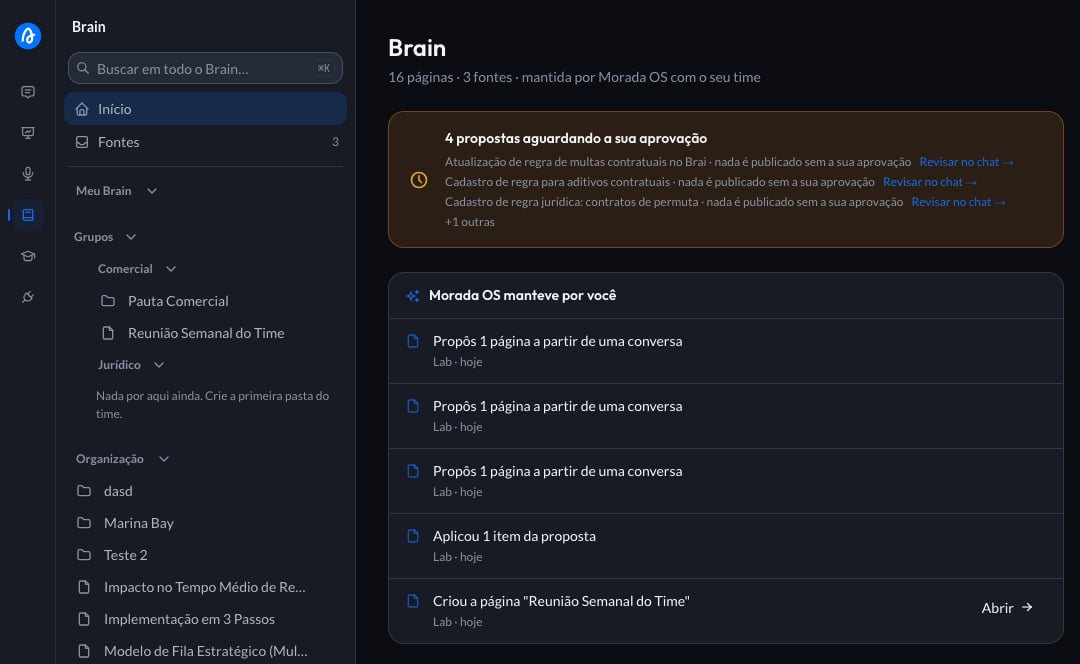
The important part: **a group is a space, not a permission toggle**. It has its own root in the Brain sidebar, with its own folders and pages. Every group your company creates becomes one more root under **Grupos**.

<img src="https://mintcdn.com/moradaai-f7bfc739/Z89N6chvTainfxWZ/images/morada-os/brain/brain-sidebar-grupos.png?fit=max&auto=format&n=Z89N6chvTainfxWZ&q=85&s=2a100d5c7264a5cdda68f7a425463a36" alt="Brain sidebar showing the Grupos section with the Comercial and Jurídico groups" width="1080" height="664" data-path="images/morada-os/brain/brain-sidebar-grupos.png" />

<Info>
  An empty group shows **"Nada por aqui ainda."** (nothing here yet) in the sidebar. Whoever can organize the space also sees the invitation to create the team's first folder.
</Info>

### For an outsider, the content simply does not exist

This holds everywhere in the product, at the same time:

<Columns cols={2}>
  <Card title="Sidebar" icon="bars">
    The group's root does not appear. There is no greyed-out folder, no padlock, no "restricted content".
  </Card>

  <Card title="Search" icon="magnifying-glass">
    The group's pages do not enter the results of anyone outside the team.
  </Card>

  <Card title="Fontes" icon="file-arrow-up">
    Files uploaded to the group do not appear in an outsider's library.
  </Card>

  <Card title="Assistant answers" icon="sparkles">
    The assistant does not use the group's content to answer someone outside the team.
  </Card>
</Columns>

<Tip>
  If someone sends you a link to a folder of a group you are not part of, the screen says that content lives in a group's space and suggests asking someone on the team to include you. None of the content shows.
</Tip>

***

## The three rules that settle almost everything

### 1. Each piece of content lives in one place only

Like a file lives in one folder. There is no "publish to Comercial and also to Jurídico": either the content belongs to both teams, and then it moves one rung up, or it belongs to one.

### 2. What two teams share belongs one rung up

If Comercial and Jurídico both need the same contract draft, it belongs to neither: it belongs to the workspace. If every brand in the organization needs it, it belongs to the organization.

That is the quick test: **ask who needs it and pick the rung that is exactly enough**.

### 3. The container decides

Whatever is created or uploaded **inside** a group's tree is already that group's, automatically. You do not tick anything, do not pick a permission, do not check afterwards. Just like saving a file inside a folder: it stays where you saved it.

<BrainWhereDoesItLive
  badge="Interactive · try it"
  intro="When in doubt, answer these questions in order."
  answerLabel="Where to keep it"
  restartLabel="Start over"
  yesLabel="Yes"
  noLabel="No"
  fallback={{
name: "Organização",
why: "If the content applies to the whole organization, and not just to one brand, it belongs to the organization.",
}}
  questions={[
{
  text: "Is it a draft, or material only you care about?",
  destination: {
    name: "Meu Brain",
    why: "Nobody else needs to open it, not even an administrator. When it is ready to share, you move it to a shared space.",
  },
},
{
  text: "Does only one specific team need it?",
  destination: {
    name: "That team's group",
    why: "The group is the team's space. If a second team starts needing it, then the content moves up to the workspace.",
  },
},
{
  text: "Does it apply to everyone in your workspace?",
  destination: {
    name: "Workspace",
    why: "It is the space shared by everyone who works in that brand.",
  },
},
]}
/>

```mermaid theme={null}
flowchart TD
    A{"Who needs<br/>this content?"} -->|"Only me"| B["Meu Brain"]
    A -->|"One team"| C["That team's group"]
    A -->|"My whole workspace"| D["Workspace"]
    A -->|"The whole company"| E["Organização"]
    C --> F{"Did a second team<br/>start needing it?"}
    F -->|"Yes"| D
    F -->|"No"| C
```

***

## Moving an existing folder into a group

Sometimes the team organizes itself after the content. A folder that today sits in the workspace can be moved into a group's space.

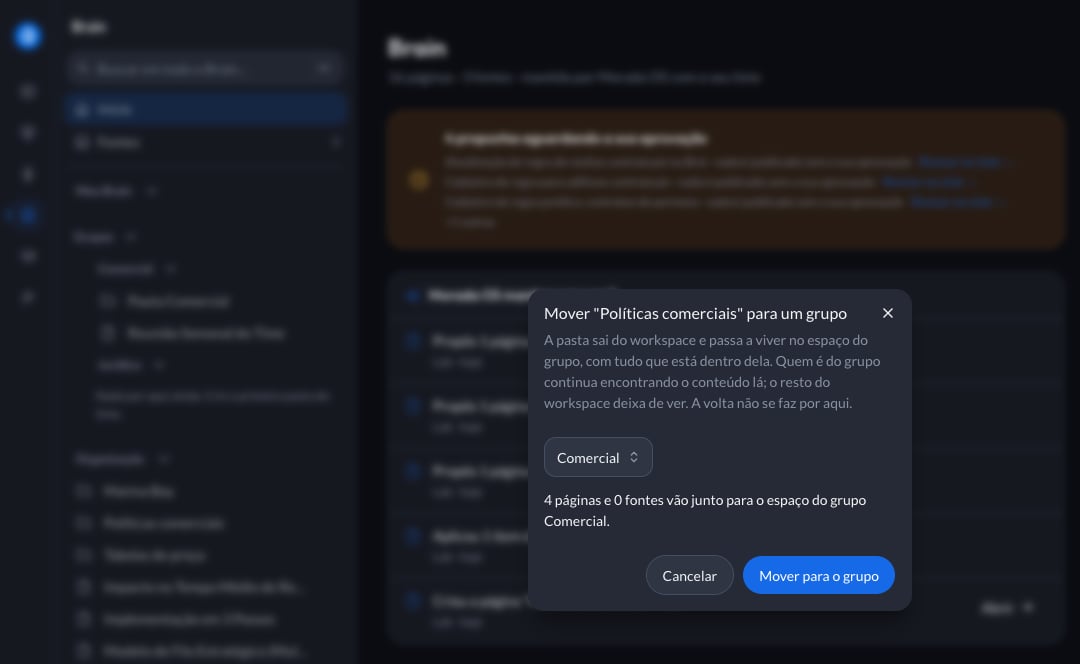
On the folder, open the actions menu and choose **Mover para um grupo** (Move to a group). As soon as you pick the group, Morada OS shows the size of the change before anything happens:

<img src="https://mintcdn.com/moradaai-f7bfc739/Z89N6chvTainfxWZ/images/morada-os/brain/mover-pasta-para-grupo.png?fit=max&auto=format&n=Z89N6chvTainfxWZ&q=85&s=3899760327baf7401af240a018483c6a" alt="The Mover para um grupo dialog showing how many pages and sources go along" width="1080" height="664" data-path="images/morada-os/brain/mover-pasta-para-grupo.png" />

The notice says how many pages and how many sources go along, and to which group. Only after you confirm does the folder change place, with everything inside it.
<Warning>
  Going in is easy, coming back is not. A folder that moved into a group's space is not brought back to the workspace through the interface. Check the notice before confirming: everyone outside the group stops seeing that content immediately.
</Warning>

A few cases where Morada OS will not move the folder, always explaining why:

<AccordionGroup>
  <Accordion title="The folder is not a root folder">
    Only a root folder changes space. A subfolder follows the folder above it.
  </Accordion>

  <Accordion title="You are not part of the destination group">
    Administering the workspace does not put you inside the team. Join the group, or ask whoever administers the organization.
  </Accordion>

  <Accordion title="The folder has proposals waiting for approval">
    A proposal remembers the space it was made in and would stop being valid after the change. Approve or discard the pending ones before moving.
  </Accordion>
</AccordionGroup>

<Note>
  **Mover para** and **Mover para um grupo** are different things. "Mover para" (Move to) reorganizes the folder inside the same space, without touching who sees it. "Mover para um grupo" is the one that changes the audience.
</Note>

***

## Uploading a source into a group

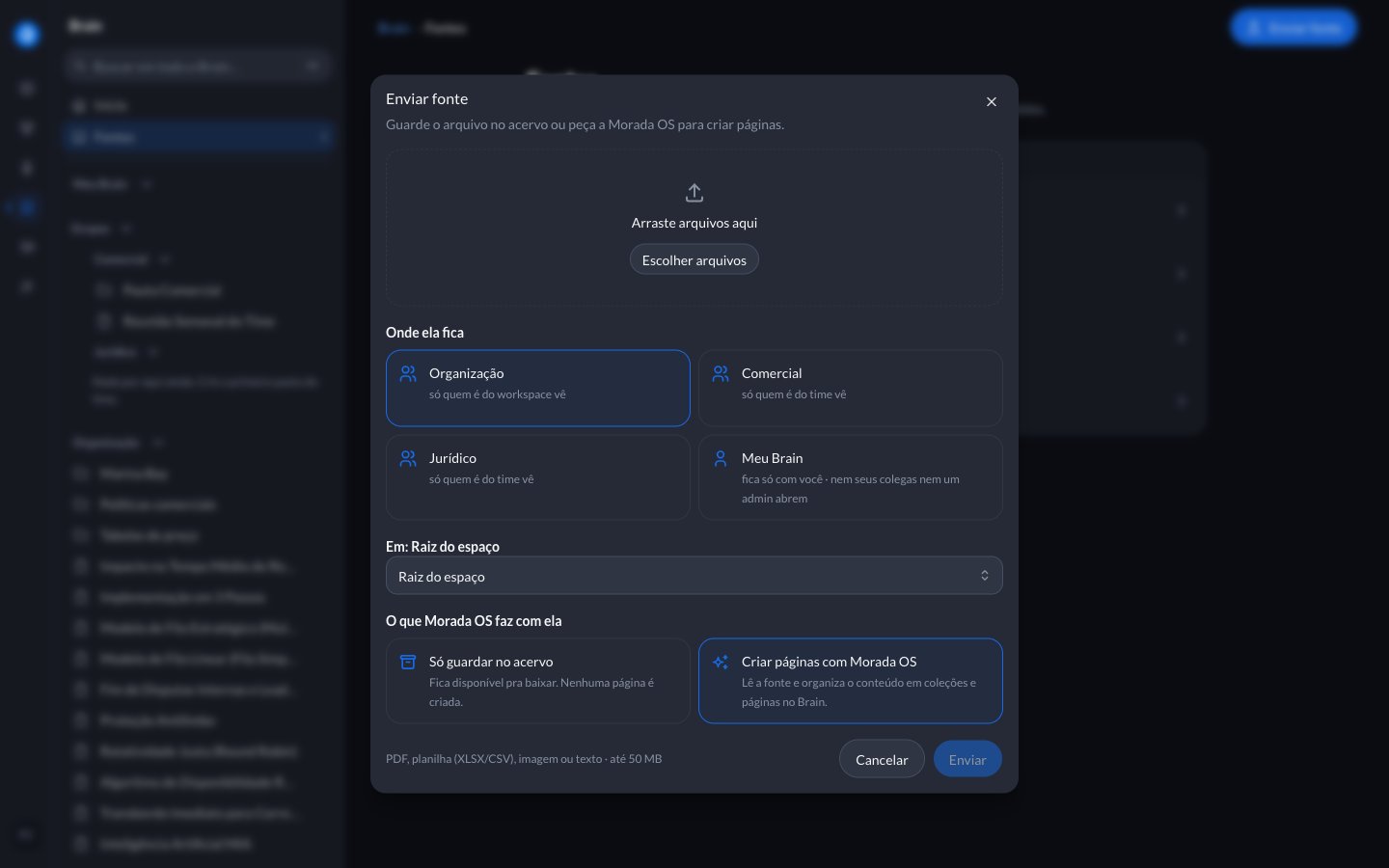
When you upload a file, groups appear as destinations at the same rank as the other spaces. Each option explains in one line who will see it:

<img src="https://mintcdn.com/moradaai-f7bfc739/Z89N6chvTainfxWZ/images/morada-os/brain/enviar-fonte-destino.png?fit=max&auto=format&n=Z89N6chvTainfxWZ&q=85&s=af6a8d431ac7d6764ba0844e926b7b34" alt="The Enviar fonte dialog with groups among the possible destinations" width="1440" height="900" data-path="images/morada-os/brain/enviar-fonte-destino.png" />

If you try to upload into a folder of a group you are not part of, Morada OS says so and suggests asking a group manager to include you.

***

## Asking the assistant to file it in a group

The assistant knows the groups **you** belong to and files content in them when you say the name:

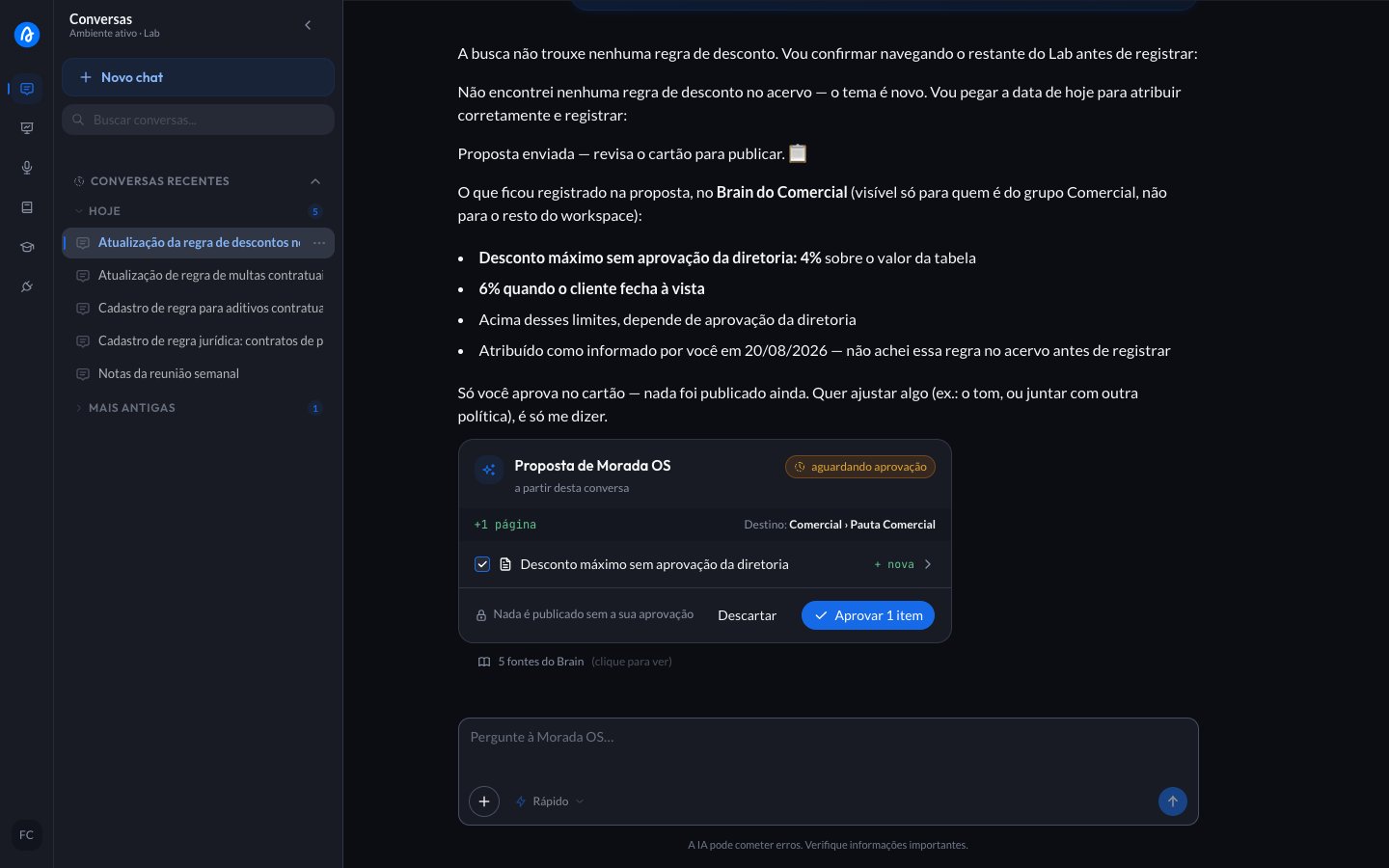
> anota no Brain do Comercial: desconto máximo sem aprovação da diretoria é 4% na tabela, e 6% quando o cliente fecha à vista.
>
> (make a note in the Comercial Brain: the maximum discount without board approval is 4% off the list price, and 6% when the client pays in full.)

The path is the same as everywhere else in the Brain: it prepares the page, shows the destination on the card and waits for your OK.
<img src="https://mintcdn.com/moradaai-f7bfc739/Z89N6chvTainfxWZ/images/morada-os/brain/proposta-destino-grupo.png?fit=max&auto=format&n=Z89N6chvTainfxWZ&q=85&s=035e0f1332da00ae3ec267b43586516f" alt="Chat proposal card showing Comercial as the destination" width="1440" height="900" data-path="images/morada-os/brain/proposta-destino-grupo.png" />

<Tip>
  Without naming a team, the assistant proposes into the workspace. If you name a group that does not exist or that you are not part of, it says so and lists your groups instead of choosing on its own.
</Tip>

***

## Creating and administering groups

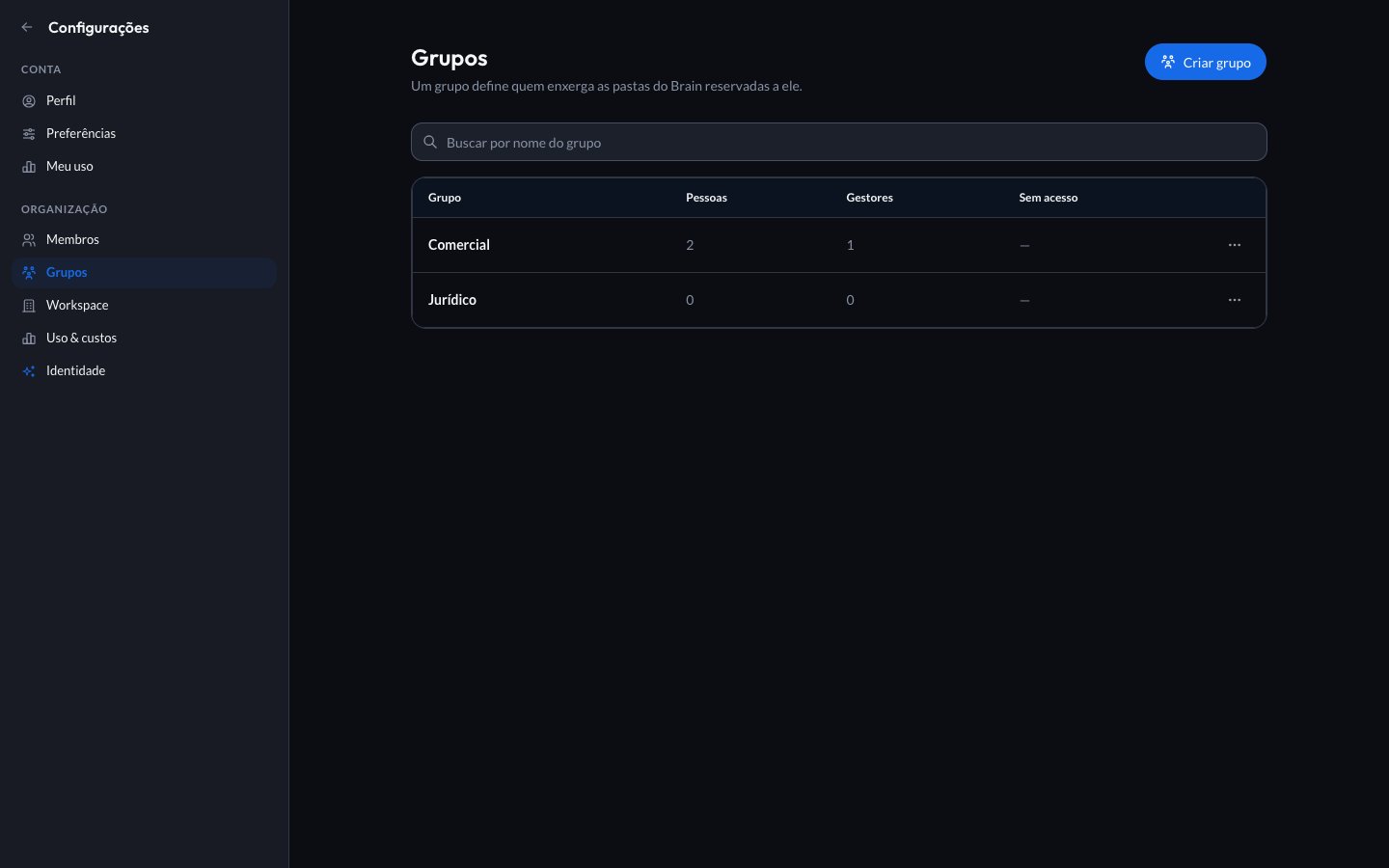
Groups are administered in **Configurações** (Settings), under the workspace's **Grupos** section. Whoever administers the organization, and whoever administers that workspace, can create, rename, deactivate and staff a group.

<img src="https://mintcdn.com/moradaai-f7bfc739/Z89N6chvTainfxWZ/images/morada-os/brain/configuracoes-grupos.png?fit=max&auto=format&n=Z89N6chvTainfxWZ&q=85&s=2d70c50447f0c4100553b076d00994dc" alt="Settings screen with the workspace's list of groups" width="1440" height="900" data-path="images/morada-os/brain/configuracoes-grupos.png" />

<Steps>
  <Step title="Create the group">
    Click **Criar grupo** (Create group) and give it a name. The name is the only information required, and it is how the assistant recognizes the team when someone asks it to file something.
  </Step>

  <Step title="Add the people">
    Open the group and use **Adicionar membro** (Add member). Only people already in the workspace show up. Each person joins as **Membro** (Member) or **Gestor** (Manager).
  </Step>

  <Step title="Create the first folder">
    In the Brain, at the group's root, create the team's first folder. From then on, everything born inside it already belongs to the group.
  </Step>
</Steps>

### Membro and Gestor

| Role                 | What they do                                                                                                      |
| -------------------- | ----------------------------------------------------------------------------------------------------------------- |
| **Membro** (Member)  | Sees and consults the group's content, and contributes by proposing changes for a manager to approve.             |
| **Gestor** (Manager) | Looks after the group's space: creates and edits folders and pages, and approves the proposals aimed at the team. |

<Note>
  Deactivating a group hides its folders from the people who were in it, but deletes nothing: the people stay registered in the group and it can be reactivated later.
</Note>

***

## Frequently asked questions

<AccordionGroup>
  <Accordion title="What is the difference between a workspace and a group?">
    The workspace is a company inside the company: a brand or a business unit, with its own administrator. The group is an area inside it: Comercial, Jurídico, Marketing, Financeiro. An area never becomes a workspace, and most companies have a single workspace.
  </Accordion>

  <Accordion title="Can whoever administers the organization read my Meu Brain?">
    No. That is the one exception that holds for everyone: Meu Brain belongs to the person. Whatever needs sharing, you move to a shared space when you want to.
  </Accordion>

  <Accordion title="Can I be in more than one group?">
    Yes. Every group you belong to becomes a root in the **Grupos** section of your Brain.
  </Accordion>

  <Accordion title="I put a folder in the wrong group. Now what?">
    Talk to whoever administers the organization. Bringing content back, or taking it to another group, is not yet done through the interface, and that is why the confirmation notice shows the size of the change before you confirm.
  </Accordion>

  <Accordion title="Why do I not see the Grupos section?">
    It appears when there is at least one group you can see. If your company has not created groups yet, or if you have not joined any, the section stays hidden.
  </Accordion>
</AccordionGroup>

***

<Card title="Back to the Brain" icon="brain" href="/morada-os/en/brain/index">
  Sources, pages, approving proposals and searching the library.
</Card>