> ## Documentation Index
> Fetch the complete documentation index at: https://docs.morada.ai/llms.txt
> Use this file to discover all available pages before exploring further.
# For IT teams
> What Morada OS asks each service's administrator to approve, why, in what order, and how to revoke access at any time.
This page is for whoever administers the company's tools (IT, Microsoft 365, Google Workspace, or HubSpot administrators). The rest of the documentation is written for the people who use the product day to day.
The product interface is currently in Portuguese, so Morada OS labels below are shown as they appear on screen, with English translations in parentheses.
If you got here because of the **"Necessita aprovação do administrador"** (Admin approval required) message during the Microsoft 365 connection, go straight to [Microsoft 365](#microsoft-365).
***
## How people sign in
Morada OS lives at [os.morada.ai](https://os.morada.ai) and uses your company's corporate login (Morada SSO, at `id.morada.ai`). Only people your organization authorized can get in. If your network filters domains, start by allowing those two addresses and check the full list for your environment with Morada.ai.
***
## Three principles that apply to every connector
Each user connects their own account and gets exactly the permissions they already hold in that service. Morada OS never widens access.
On connection, the assistant can only **read**. Writing is an additional step, requested separately.
Every action that changes something in an external system is assembled, shown in full, and executed only after that person clicks.
***
## Microsoft 365
### Why the administrator gets called in
Some tenants block per-user consent. In those cases Microsoft shows **"Necessita aprovação do administrador"** (Admin approval required) on the first connection and the user cannot finish alone. A Microsoft Entra administrator settles it once, for the whole organization.
### What stays under your control
Inside Morada OS, under **Conectores > Microsoft 365** (Connectors), an administrator sees an **Administração** (Administration) tab and releases to the organization only the services they choose: OneDrive, SharePoint, Outlook, and Teams, permission by permission. Whatever is checked there is the **organization's ceiling**, and unchecking drops access for everyone immediately.
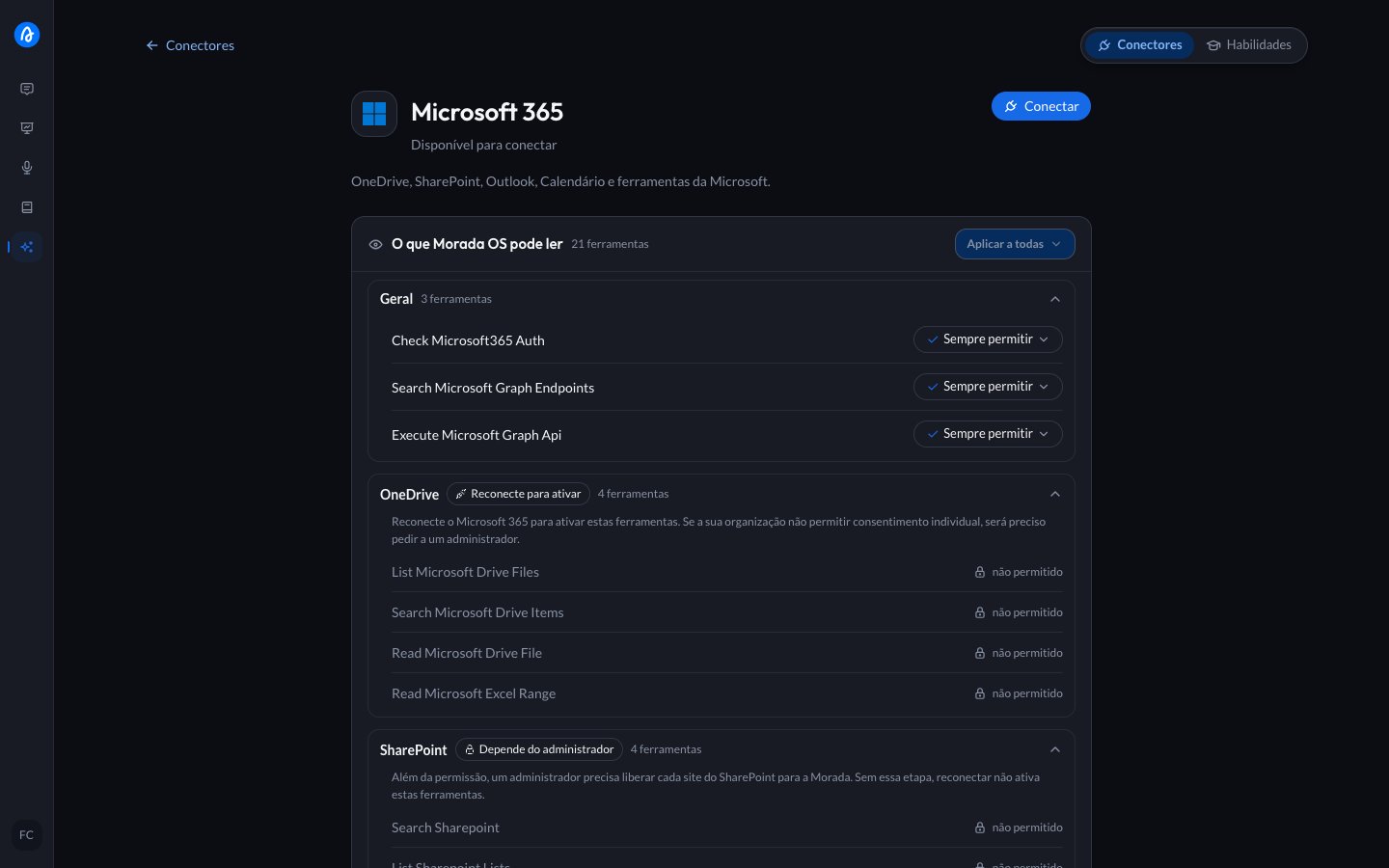
Opening the Microsoft 365 card, each tool group shows where it stands: **Depende do administrador** (waiting on the organization's release), **Reconecte para ativar** (released, the person still has to reconnect), or already released. That way the user knows what to ask you for, and you know what is missing.
 The full walkthrough, with the table for every permission, the two paths for SharePoint access, and the three ways to revoke. About 15 minutes.
### Three things that usually surprise people
Write permissions granted in the **Administração** tab apply to the organization, but each user only starts using them after allowing it on their own account. The chat offers that permission at the moment an action requires it, not before. So even with the company-wide release, nobody writes without their own consent and without approving each action.
The organization-wide release does not refresh the session of someone already connected, including yours. If something stays blocked right after the grant, unlink Microsoft 365 and connect again.
Connecting Microsoft 365 asks only for identity (name, email, and permission to keep the session). Access to email, files, or calendar is requested only when a concrete request needs it, through a card in the conversation, and always within the ceiling you set.
***
## HubSpot
Each user connects their own account, and the assistant inherits that account's CRM permissions. To install or uninstall the app, the user must be a **Super Admin** or hold the **App Marketplace access** permission.
The full walkthrough, including uninstalling on the HubSpot side, is in [Connect HubSpot](/morada-os/en/connectors/hubspot).
***
## Google Workspace and Notion
These are also per-user connections, with that account's permissions and read before write. If your company restricts third-party applications (API controls in Google Workspace, integration approval in Notion), the administrator has to allow the **Morada OS** app before users can complete the connection.
***
## How to revoke access
| Where | What to do | Effect |
| ------------------------------------------- | --------------------------------------------------------------------------------------------------- | ------------------------------------------------------------------------------------------------------------------- |
| **Morada OS** | **Conectores** (Connectors), open the card and click **Desvincular** (Unlink). | The stored credential is deleted immediately and the assistant stops accessing the service. |
| **Morada OS (Microsoft 365, organization)** | **Administração** tab, uncheck the permission and save. | Drops that access for the whole organization immediately, including people who had allowed it on their own account. |
| **Microsoft (user)** | [myapplications.microsoft.com](https://myapplications.microsoft.com) > app > remove permissions. | Ends that user's authorization on the Microsoft side. |
| **Microsoft (organization)** | Microsoft Entra > **Enterprise applications** > app > **Permissions**. | Ends the consent granted for the tenant. |
| **HubSpot** | Settings > **Integrations > Connected Apps** > **Actions > Uninstall**. | Removes the app from the HubSpot account. |
| **Google** | [myaccount.google.com/connections](https://myaccount.google.com/connections) > app > remove access. | Ends that user's authorization. |
Unlinking in Morada OS deletes the credential we store, but does not by itself revoke the consent recorded at the provider. To end it on both sides, also run the revocation in the matching row above.
***
## IT frequently asked questions
No. Conversations, files, and documents are never used to train or improve third-party models, and model providers are accessed under corporate agreements that restrict usage to generating the answer. Details in [Security and privacy](/morada-os/en/security-and-privacy).
No. Administrators see aggregated usage data only. Conversation content is private to each user.
Morada OS data lives in a dedicated database, strictly separated by organization and workspace. Spreadsheet and document processing runs in isolated, temporary environments.
In the [Terms of service](/morada-os/en/terms-of-service) and the [Privacy policy](/morada-os/en/privacy-policy), which cover roles under Brazil's LGPD, legal bases, retention, and the Data Protection Officer channel (`dpo@morada.ai`).
* **Help center**: [support.morada.ai](https://support.morada.ai)
* **Email**: `suporte@morada.ai`
* **Platform status**: [status.morada.ai](https://status.morada.ai)
The full walkthrough, with the table for every permission, the two paths for SharePoint access, and the three ways to revoke. About 15 minutes.
### Three things that usually surprise people
Write permissions granted in the **Administração** tab apply to the organization, but each user only starts using them after allowing it on their own account. The chat offers that permission at the moment an action requires it, not before. So even with the company-wide release, nobody writes without their own consent and without approving each action.
The organization-wide release does not refresh the session of someone already connected, including yours. If something stays blocked right after the grant, unlink Microsoft 365 and connect again.
Connecting Microsoft 365 asks only for identity (name, email, and permission to keep the session). Access to email, files, or calendar is requested only when a concrete request needs it, through a card in the conversation, and always within the ceiling you set.
***
## HubSpot
Each user connects their own account, and the assistant inherits that account's CRM permissions. To install or uninstall the app, the user must be a **Super Admin** or hold the **App Marketplace access** permission.
The full walkthrough, including uninstalling on the HubSpot side, is in [Connect HubSpot](/morada-os/en/connectors/hubspot).
***
## Google Workspace and Notion
These are also per-user connections, with that account's permissions and read before write. If your company restricts third-party applications (API controls in Google Workspace, integration approval in Notion), the administrator has to allow the **Morada OS** app before users can complete the connection.
***
## How to revoke access
| Where | What to do | Effect |
| ------------------------------------------- | --------------------------------------------------------------------------------------------------- | ------------------------------------------------------------------------------------------------------------------- |
| **Morada OS** | **Conectores** (Connectors), open the card and click **Desvincular** (Unlink). | The stored credential is deleted immediately and the assistant stops accessing the service. |
| **Morada OS (Microsoft 365, organization)** | **Administração** tab, uncheck the permission and save. | Drops that access for the whole organization immediately, including people who had allowed it on their own account. |
| **Microsoft (user)** | [myapplications.microsoft.com](https://myapplications.microsoft.com) > app > remove permissions. | Ends that user's authorization on the Microsoft side. |
| **Microsoft (organization)** | Microsoft Entra > **Enterprise applications** > app > **Permissions**. | Ends the consent granted for the tenant. |
| **HubSpot** | Settings > **Integrations > Connected Apps** > **Actions > Uninstall**. | Removes the app from the HubSpot account. |
| **Google** | [myaccount.google.com/connections](https://myaccount.google.com/connections) > app > remove access. | Ends that user's authorization. |
Unlinking in Morada OS deletes the credential we store, but does not by itself revoke the consent recorded at the provider. To end it on both sides, also run the revocation in the matching row above.
***
## IT frequently asked questions
No. Conversations, files, and documents are never used to train or improve third-party models, and model providers are accessed under corporate agreements that restrict usage to generating the answer. Details in [Security and privacy](/morada-os/en/security-and-privacy).
No. Administrators see aggregated usage data only. Conversation content is private to each user.
Morada OS data lives in a dedicated database, strictly separated by organization and workspace. Spreadsheet and document processing runs in isolated, temporary environments.
In the [Terms of service](/morada-os/en/terms-of-service) and the [Privacy policy](/morada-os/en/privacy-policy), which cover roles under Brazil's LGPD, legal bases, retention, and the Data Protection Officer channel (`dpo@morada.ai`).
* **Help center**: [support.morada.ai](https://support.morada.ai)
* **Email**: `suporte@morada.ai`
* **Platform status**: [status.morada.ai](https://status.morada.ai)