> ## Documentation Index
> Fetch the complete documentation index at: https://docs.morada.ai/llms.txt
> Use this file to discover all available pages before exploring further.
# Find out what your competitors launched in your region
> Ask the assistant for an overview of your competitors' recent launches, with prices when public and links to the sources.
**You need:** nothing beyond Morada OS · **Last updated:** August 16, 2026
## What you'll get
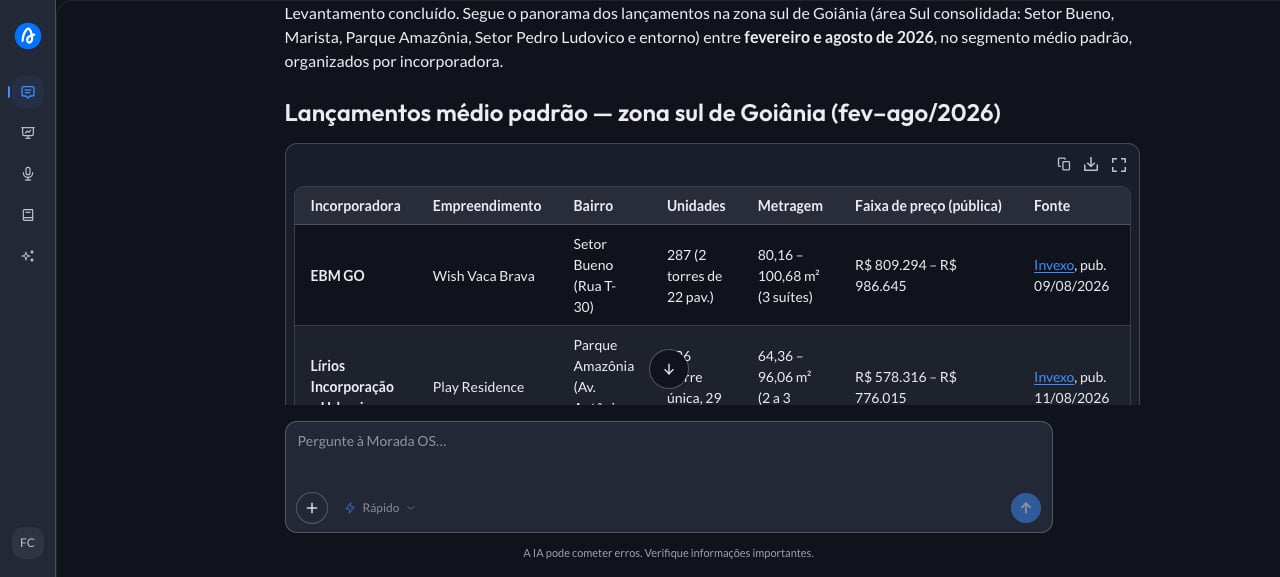
An overview of recent launches in your region: who launched, where, what kind of product, and, when the information is public, the price range. Every item comes with a link to its source, so you can check it and use it safely in a conversation with a client.
 ***
## Step by step
This is the request you'll use. Copy the whole thing.
```text wrap theme={null}
Search the web for recent real estate launches in [your city or region], in the [segment, e.g. mid-market] segment. Consider only the last [period, e.g. 6 months]. For each launch, give me the developer, the neighborhood, the number of units, the floor area, and the price range when it's public. Organize it as a list by developer and cite the source of each piece of information.
```
You're putting together the week's sales pitch and you need to know what competitors launched in your region. There's no time to open portal after portal or call every agent you know. You open Morada OS and type:
The assistant searches the web and answers with an organized list, and every data point carries the link it came from (developer's site, listing portal, news article). Skim the whole list first, then click the sources for the two or three launches that actually compete with yours. List prices go stale fast, so confirm at the source before quoting a number to a client.
***
## Keep the conversation going
> "Go deeper on \[developer]'s launch: what are the floor plans, the delivery date, and the payment terms announced?"
> "Turn this result into a table with developer, neighborhood, floor area, and price per square meter."
> "Write a five-line summary of this research for me to send to the sales team."
***
## Tips and common problems
* **Be specific about the region and the period.** "South side of Goiânia over the last 6 months" gives a much better result than "Goiás".
* **If the results look old, tighten the window.** Write "only consider news from the last month" and ask again.
* **The search covers the open web.** For questions about your own company (price table, sales policy, sales manual), the place to look is the Brain, your organization's document library.
***
## Similar cases
* [Keep up with real estate news in your city](/morada-os/en/use-cases/market-news). Also web search only, no setup.
* [Get to know a company before the meeting](/morada-os/en/use-cases/research-a-company). Also with no prerequisites.
* **Cross competitor prices with your own price table** (coming soon). This one needs the price table available in the Brain or uploaded to the chat.
***
## Step by step
This is the request you'll use. Copy the whole thing.
```text wrap theme={null}
Search the web for recent real estate launches in [your city or region], in the [segment, e.g. mid-market] segment. Consider only the last [period, e.g. 6 months]. For each launch, give me the developer, the neighborhood, the number of units, the floor area, and the price range when it's public. Organize it as a list by developer and cite the source of each piece of information.
```
You're putting together the week's sales pitch and you need to know what competitors launched in your region. There's no time to open portal after portal or call every agent you know. You open Morada OS and type:
The assistant searches the web and answers with an organized list, and every data point carries the link it came from (developer's site, listing portal, news article). Skim the whole list first, then click the sources for the two or three launches that actually compete with yours. List prices go stale fast, so confirm at the source before quoting a number to a client.
***
## Keep the conversation going
> "Go deeper on \[developer]'s launch: what are the floor plans, the delivery date, and the payment terms announced?"
> "Turn this result into a table with developer, neighborhood, floor area, and price per square meter."
> "Write a five-line summary of this research for me to send to the sales team."
***
## Tips and common problems
* **Be specific about the region and the period.** "South side of Goiânia over the last 6 months" gives a much better result than "Goiás".
* **If the results look old, tighten the window.** Write "only consider news from the last month" and ask again.
* **The search covers the open web.** For questions about your own company (price table, sales policy, sales manual), the place to look is the Brain, your organization's document library.
***
## Similar cases
* [Keep up with real estate news in your city](/morada-os/en/use-cases/market-news). Also web search only, no setup.
* [Get to know a company before the meeting](/morada-os/en/use-cases/research-a-company). Also with no prerequisites.
* **Cross competitor prices with your own price table** (coming soon). This one needs the price table available in the Brain or uploaded to the chat.