> ## Documentation Index
> Fetch the complete documentation index at: https://docs.morada.ai/llms.txt
> Use this file to discover all available pages before exploring further.
# Write the announcement copy for a launch
> Describe the development and get three ready versions of the announcement: WhatsApp, email, and a social media post.
**You need:** the development's information (as text or in a file) · **Last updated:** August 16, 2026
## What you'll get
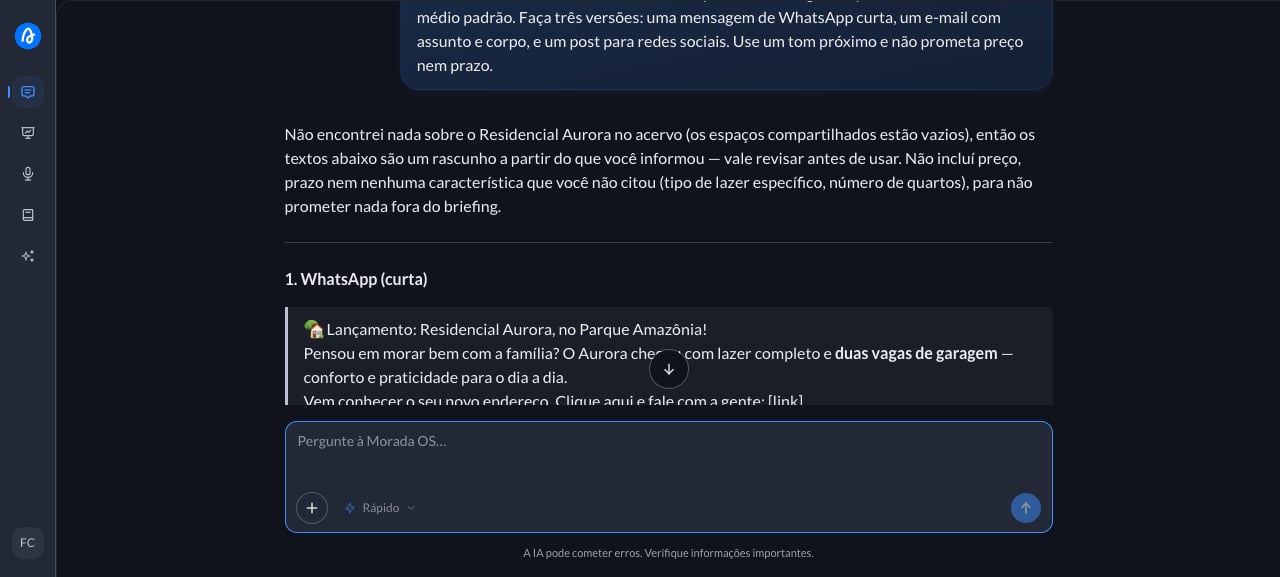
Three pieces of copy for the same launch, each in the tone of its channel: a short WhatsApp message, an email with a subject line and body, and a post for social media. All built from the information you gave, without inventing a selling point the development doesn't have.
 ***
## Step by step
This is the request you'll use. Copy the whole thing.
```text wrap theme={null}
Write the announcement copy for the launch of [development name], in [neighborhood and city]. The selling points are [selling points, e.g. full amenities and two parking spaces] and the audience is [audience, e.g. mid-market families]. Write three versions: a short WhatsApp message, an email with a subject line and body, and a social media post. Use a warm tone and don't promise a price or a delivery date.
```
The launch opens on Friday and the sales team needs the copy today. You have the development's material, but you don't have the afternoon free to write three different versions. You open Morada OS and type (or drag the material in first):
The three versions come back separated by channel and ready to copy. Read them with the eyes of the person who'll receive them and cut whatever sounds overblown: sales copy tends to stretch a promise. Also check whether any number showed up that you didn't provide (price, delivery date, floor area), because that kind of information can only go into an announcement once it's officially confirmed.
***
## Keep the conversation going
> "Make the WhatsApp version shorter, three lines at most."
> "Write another version of the post aimed at investors instead of residents."
> "Suggest five different subject lines for this email."
***
## Tips and common problems
* **Name the audience first.** The same development becomes one piece of copy for families and a very different one for investors.
* **List the selling points as bullets.** The more concrete the input ("indoor pool, 2 parking spaces, 300 meters from the metro"), the less generic the copy.
* **Review price, timeline, and floor area before publishing.** Ask it to "not mention price or delivery date" when those aren't final yet.
***
## Similar cases
* [Turn a long report into a summary for the board](/morada-os/en/use-cases/summarize-a-report). Also turns long material into short text.
* [Get to know a company before the meeting](/morada-os/en/use-cases/research-a-company). Useful for tailoring your pitch to the partner.
* **Send the campaign by email straight from the chat** (coming soon). This one needs email connected, and nothing is sent without your approval.
***
## Step by step
This is the request you'll use. Copy the whole thing.
```text wrap theme={null}
Write the announcement copy for the launch of [development name], in [neighborhood and city]. The selling points are [selling points, e.g. full amenities and two parking spaces] and the audience is [audience, e.g. mid-market families]. Write three versions: a short WhatsApp message, an email with a subject line and body, and a social media post. Use a warm tone and don't promise a price or a delivery date.
```
The launch opens on Friday and the sales team needs the copy today. You have the development's material, but you don't have the afternoon free to write three different versions. You open Morada OS and type (or drag the material in first):
The three versions come back separated by channel and ready to copy. Read them with the eyes of the person who'll receive them and cut whatever sounds overblown: sales copy tends to stretch a promise. Also check whether any number showed up that you didn't provide (price, delivery date, floor area), because that kind of information can only go into an announcement once it's officially confirmed.
***
## Keep the conversation going
> "Make the WhatsApp version shorter, three lines at most."
> "Write another version of the post aimed at investors instead of residents."
> "Suggest five different subject lines for this email."
***
## Tips and common problems
* **Name the audience first.** The same development becomes one piece of copy for families and a very different one for investors.
* **List the selling points as bullets.** The more concrete the input ("indoor pool, 2 parking spaces, 300 meters from the metro"), the less generic the copy.
* **Review price, timeline, and floor area before publishing.** Ask it to "not mention price or delivery date" when those aren't final yet.
***
## Similar cases
* [Turn a long report into a summary for the board](/morada-os/en/use-cases/summarize-a-report). Also turns long material into short text.
* [Get to know a company before the meeting](/morada-os/en/use-cases/research-a-company). Useful for tailoring your pitch to the partner.
* **Send the campaign by email straight from the chat** (coming soon). This one needs email connected, and nothing is sent without your approval.