

If you got here because of the “Necessita aprovação do administrador” (Admin approval required) message during the Microsoft 365 connection, go straight to Microsoft 365.
How people sign in
Morada OS lives at os.morada.ai and uses your company’s corporate login (Morada SSO, atid.morada.ai). Only people your organization authorized can get in. If your network filters domains, start by allowing those two addresses and check the full list for your environment with Morada.ai.
Three principles that apply to every connector
Connections are per person
Each user connects their own account and gets exactly the permissions they already hold in that service. Morada OS never widens access. With ERPs the reach is narrower, and that section explains why.
Read first
On connection, the assistant can only read. Writing is an additional step, requested separately. The exception is the custom connector, where every tool asks for confirmation.
Writes go through approval
Every action that changes something in an external system is assembled, shown in full, and executed only after that person clicks.
Microsoft 365
Why the administrator gets called in
Some tenants block per-user consent. In those cases Microsoft shows “Necessita aprovação do administrador” (Admin approval required) on the first connection and the user cannot finish alone. A Microsoft Entra administrator settles it once, for the whole organization.What stays under your control
Inside Morada OS, under Conectores > Microsoft 365 (Connectors), an administrator sees an Administração (Administration) tab and releases to the organization only the services they choose: OneDrive, SharePoint, Outlook, and Teams, permission by permission. Whatever is checked there is the organization’s ceiling, and unchecking drops access for everyone immediately. Opening the Microsoft 365 card, each tool group shows where it stands: Depende do administrador (waiting on the organization’s release), Reconecte para ativar (released, the person still has to reconnect), or already released. That way the user knows what to ask you for, and you know what is missing.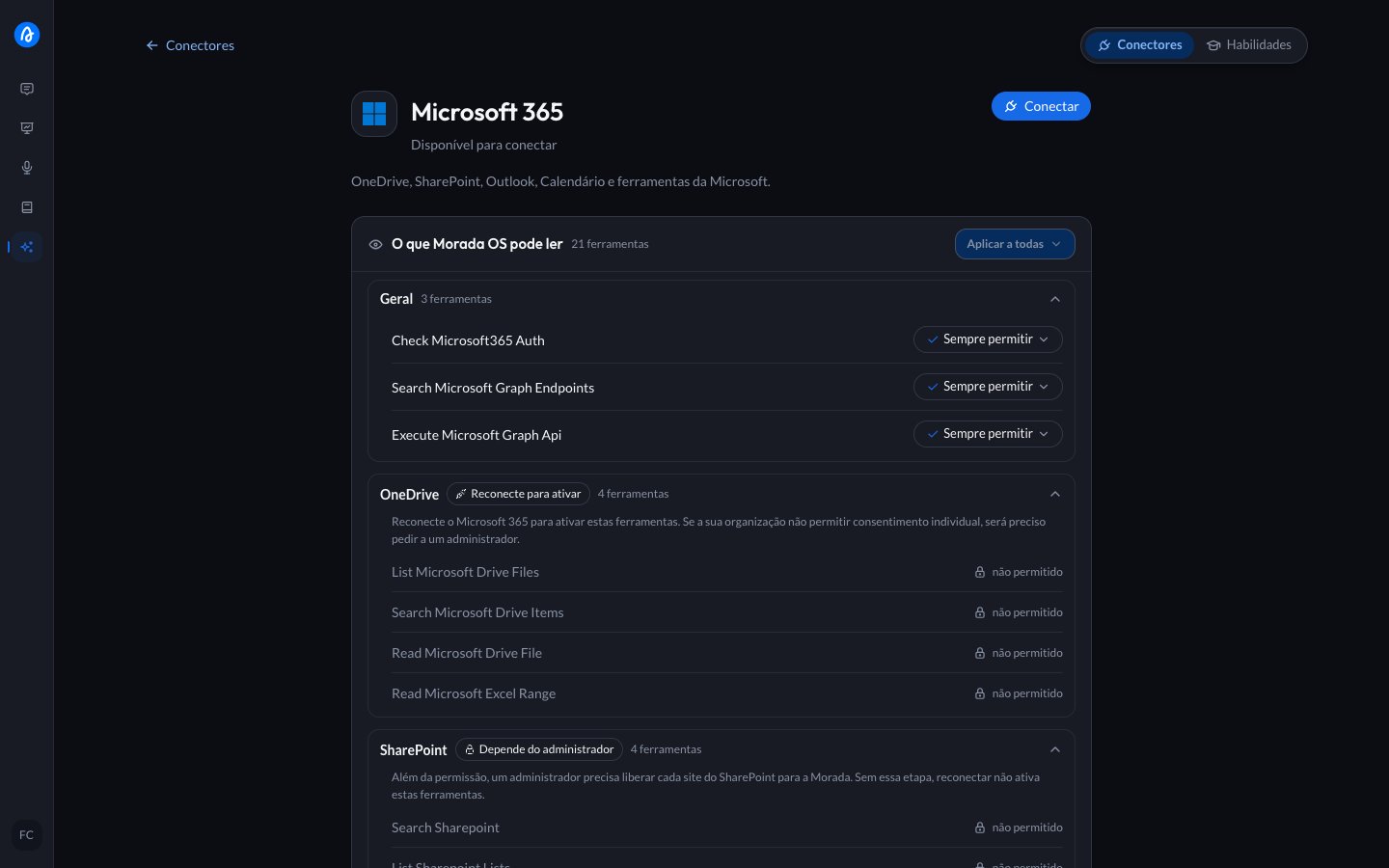
Microsoft 365: administrator guide
The full walkthrough, with the table for every permission, the two paths for SharePoint access, and the three ways to revoke. About 15 minutes.
Three things that usually surprise people
Releasing writes for the organization does not release writes for each person
Releasing writes for the organization does not release writes for each person
Write permissions granted in the Administração tab apply to the organization, but each user only starts using them after allowing it on their own account. The chat offers that permission at the moment an action requires it, not before. So even with the company-wide release, nobody writes without their own consent and without approving each action.
After releasing, people need to reconnect
After releasing, people need to reconnect
The organization-wide release does not refresh the session of someone already connected, including yours. If something stays blocked right after the grant, unlink Microsoft 365 and connect again.
The first sign-in asks for no content at all
The first sign-in asks for no content at all
Connecting Microsoft 365 asks only for identity (name, email, and permission to keep the session). Access to email, files, or calendar is requested only when a concrete request needs it, through a card in the conversation, and always within the ceiling you set.
HubSpot
Each user connects their own account, and the assistant inherits that account’s CRM permissions. To install or uninstall the app, the user must be a Super Admin or hold the App Marketplace access permission. The full walkthrough, including uninstalling on the HubSpot side, is in Connect HubSpot.Google Workspace and Notion
These are also per-user connections, with that account’s permissions and read before write. If your company restricts third-party applications (API controls in Google Workspace, integration approval in Notion), the administrator has to allow the Morada OS app before users can complete the connection.ERPs
The ERP connectors — UAU, Mega and Capys — follow a different rule from Microsoft 365 and Google Workspace. With those two, a person connects their account and Morada OS sees what they see. With an ERP, Morada OS reaches less than the person reaches on the system’s own screens, for two reasons that are not Morada OS’s to change.The vendor decides what opens
Each ERP decides which queries are available to integrations at all. A screen someone uses every day may have no equivalent, and no permission fixes that.
Some require a separate clearance
In some of them, using the system on screen is not enough: the login needs its own authorization for integration use, granted by the ERP administrator.
UAU
Morada is the integrator registered with UAU and looks after the integration key, so nobody at your company needs to hold or type that key. What falls to your UAU administrator is authorizing Morada: in the UAU portal, under Área do cliente → Desenvolvedor, pick Morada and the environment your company will use (Production or Test), then click Adicionar Permissão. The path is in Senior’s step-by-step guide with screenshots. After that, each person on the team connects with their own UAU login. Two things do not come through the integration, and neither is a permission problem:- Payslips and the calculated payroll. UAU does not make the payslip PDF or the closed payroll available to integrations, even for someone who opens both on screen every month. When a request depends on those documents, Morada OS reads the files where your company already keeps them, such as SharePoint.
- The link between a login and an employee record. UAU does not store that relationship, so “my details” has no direct answer. Ask by payroll number or by name, always with the company.
Mega
The permission is the Usuário de APIs option, in each user’s record (Configurações Globais → Segurança → Grupos e usuários). The connection also asks for the Mega Registro, your company’s 36-character code in Mega, which the administrator finds under Configurações Globais → Registrar Sistema. Both steps, with screenshots, are in Senior’s Mega Cloud API guide. Ask for one login per person, never a shared one. Mega keeps a single active connection per login. If two people connect with the same one, each knocks the other out, and it surfaces as an error that comes and goes with no explanation — the kind of problem that costs days to diagnose. Reach also depends on the modules the login can open and the ones your company has contracted in Mega. The Mega guide covers what you can ask, the usage cautions and how to connect.Capys
The connection uses the person’s own Capys login, in three fields: E-mail, Senha (password) and ID da organização (organization ID). The ID identifies your company in Capys, and the login does not work without it. It appears in the address of the Capys login screen: open the Capys organization list, pick your company and copy the code afterid= in the address of the page that opens. It is 36 characters long, in the format 3f2504e0-4f89-41d3-9a0c-0305e82c3301.
What Morada OS can query depends on the modules your company has contracted. Lead and sales-funnel queries need the Vendas (sales) module. Morada OS can tell you which modules are available: ask, and it answers from its own access.
The Capys guide covers what you can ask, how to connect and the usage cautions.
How to revoke access
IT frequently asked questions
Does our company's data train AI models?
Does our company's data train AI models?
No. Conversations, files, and documents are never used to train or improve third-party models, and model providers are accessed under corporate agreements that restrict usage to generating the answer. Details in Security and privacy.
Can an administrator read the team's conversations?
Can an administrator read the team's conversations?
Not by their role. Administrators see aggregated usage data only, and conversation content is private to each user. An administrator only sees a conversation if its owner shares a copy with them, as they would with any colleague.
How is one organization's data separated from another's?
How is one organization's data separated from another's?
Morada OS data lives in a dedicated database, strictly separated by organization and workspace. Spreadsheet and document processing runs in isolated, temporary environments.
Where do I find the formal commitments?
Where do I find the formal commitments?
In the Terms of service and the Privacy policy, which cover roles under Brazil’s LGPD, legal bases, retention, and the Data Protection Officer channel (
dpo@morada.ai).Who do I talk to about the rollout?
Who do I talk to about the rollout?
- Help center: support.morada.ai
- Email:
suporte@morada.ai - Platform status: status.morada.ai