

Meu Brain (My Brain) has no review: you look after your own space, so applying is already your OK.
Who does what
Whoever proposes
Anyone in the place. The simplest way is to ask in the conversation: the assistant builds the proposal and shows where it goes.
Whoever looks after the place
The group manager, the workspace administrator or the organization’s. Reviews, comments, decides and applies.
The assistant
Prepares, reads, summarizes and comments. It never decides on its own: every decision waits for your OK.
The path of a proposal
1
Someone proposes
For example: “anota no Brain do Comercial que o prazo de reserva passou para 72 horas” (note in the Comercial Brain that the reservation deadline is now 72 hours). The assistant drafts the page and shows a card with what will be written and where. If you look after that place, your OK applies it. If not, the proposal goes to whoever does.
2
Whoever looks after the place reviews
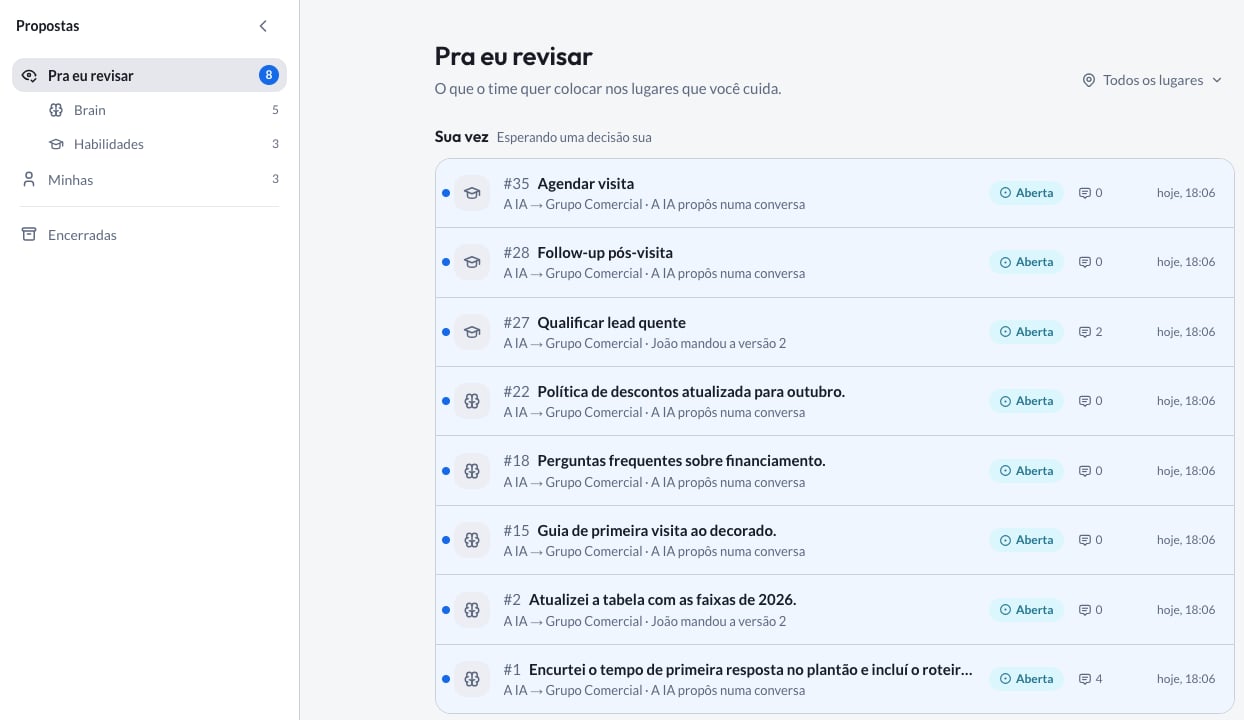
The proposal shows up in Propostas (Proposals), in the Pra eu revisar (To review) tab of whoever looks after the place, with the number next to it counting how many are waiting.
3
Someone decides
Aprovar e aplicar (Approve and apply), Só aprovar (Just approve), Devolver com comentário (Return with a comment) to ask for an adjustment, or Recusar (Decline). Whoever proposed can Retirar (Withdraw) while the proposal is open.
4
The change goes in
Once applied, the change shows up in the place, and the proposal moves to Encerradas (Closed) with its whole history.
Where proposals live
Propostas (Proposals), in the side menu, brings together everything proposed for the Brain and for skills:- Pra eu revisar (To review): what your team wants to add to the places you look after. Sua vez (Your turn) holds what waits for a decision of yours; Com outras pessoas (With others) holds what you already did your part on.
- Minhas (Mine): what you proposed, and where it stands.
- Encerradas (Closed): the applied, declined and withdrawn ones.
A proposal’s page
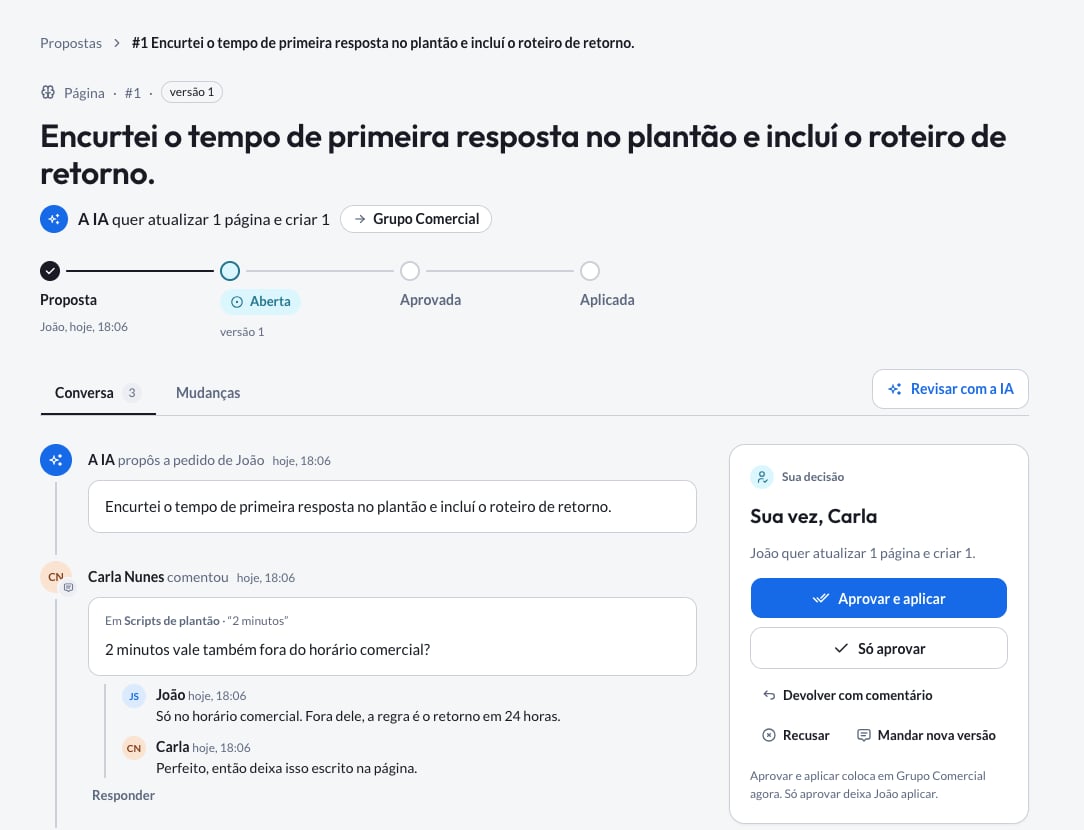
Each proposal has its own page, with everything you need to decide:- Conversa (Conversation): the comments, versions and decisions, in order. Type @ to loop someone in and # to cite another proposal.
- Mudanças (Changes): what the proposal adds or changes, item by item, as it will look if you apply it now. Green goes in, struck through comes out.
- Sua decisão (Your decision), in the side panel: the decision buttons and who takes part (whoever proposed and whoever looks after the place).
Reviewers read the proposal, never the conversation it was born in: your conversation stays private.
How to review well
Read how it will look, not how it was
Read how it will look, not how it was
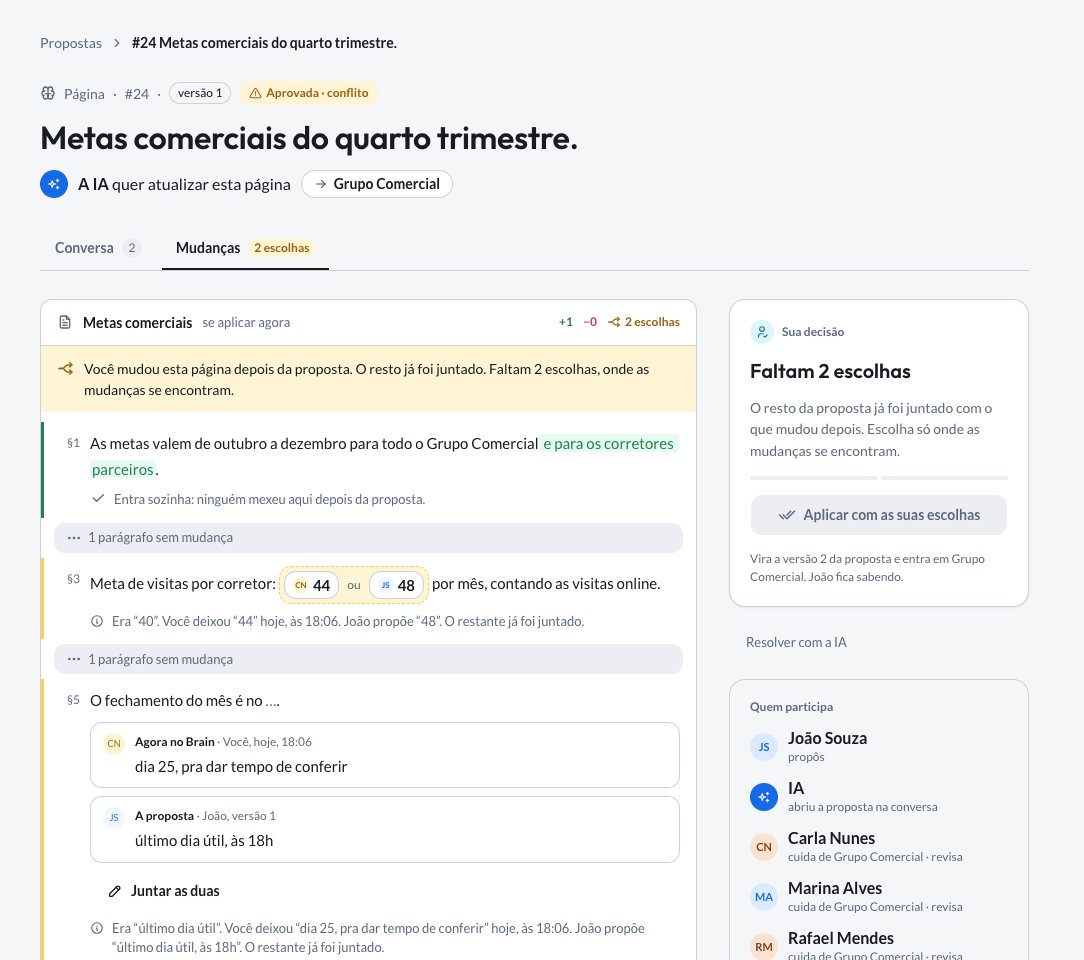
The Mudanças (Changes) tab shows the result if you apply now, already including what changed in the place after the proposal. That is what will go in.
Return it with a concrete request
Return it with a concrete request
Instead of declining something that is almost right, use Devolver com comentário (Return with a comment) and say what is missing: “troca o prazo para 72 horas úteis e cita a tabela de outubro” (change the deadline to 72 business hours and cite the October table). Whoever proposed sends a new version in the same proposal, with the same number and the whole history.
Comment on the spot
Comment on the spot
A comment about a change shows next to it in Mudanças (Changes), so whoever reads later understands what you meant.
Loop in whoever knows
Loop in whoever knows
Type @ and pick the person. Only people who can see the proposal get the notice, and you learn if someone was left out.
A new version resets the approvals
A new version resets the approvals
If the proposal changes after it was approved, the earlier approvals stop counting and it goes back to review. That way nobody approves one thing and sees another go in.
When the place changed after the proposal
Sometimes someone edits the Brain page or the skill while the proposal waits. When it is applied, nothing is lost:- Changes to different passages merge on their own, and what was edited in the meantime stays.
- Only what overlaps asks for a choice. When both changes touch the same passage, the Mudanças (Changes) tab shows both sides, with who changed each one, and you choose which stays. In Juntar as duas (Combine both), you write the text that combines both sides.
With the assistant
Everything you can do on the screen, you can ask for in the chat. Some requests that work well:
Every decision, and every comment someone else will read, shows up in a card for you to confirm first. If you choose Sempre permitir (Always allow) for an action, the assistant does that action from then on without asking.
For a proposal decision, only the Sempre permitir (Always allow) you chose yourself counts. Even if your company allows the action for everyone, the card keeps showing up for you until you decide.
Frequently asked questions
Who can see a proposal?
Who can see a proposal?
Whoever can see the destination place. A proposal for the Comercial group’s Brain is seen by the people in the group and by whoever administers the organization, who sees the content of every group in the workspace; a proposal in your Meu Brain (My Brain), only by you.
The proposal was approved, but nothing changed in the Brain.
The proposal was approved, but nothing changed in the Brain.
Approving is not applying. Open the proposal: the panel says who can apply it now.
Can I change the proposal after sending it?
Can I change the proposal after sending it?
Yes. Ask the assistant for a new version, in the same conversation or with the proposal number. It goes back to review.
I look after the place. Do I need a proposal?
I look after the place. Do I need a proposal?
Not for what you edit directly. What the assistant writes, yes: it always proposes, and you apply with one click.
Do I get an e-mail?
Do I get an e-mail?
Not yet. Notices show up in Morada OS: the dot on the Propostas icon, the number on Pra eu revisar (To review) and mentions in Notificações (Notifications).
Organization, workspaces and groups
Who looks after each place and who sees what.