

Connect your account, just once
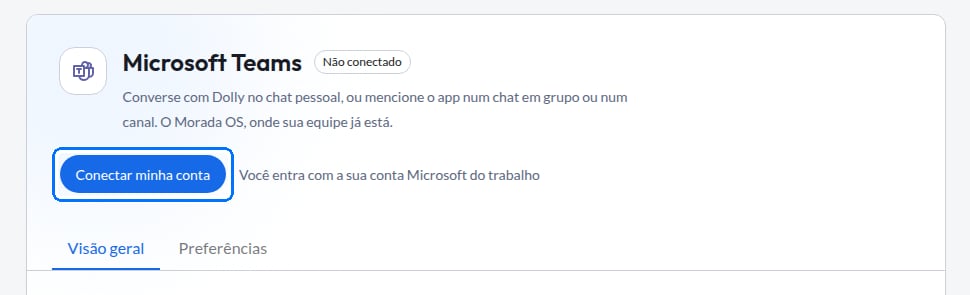
Before your first conversation, link your Teams account to your Morada OS account. That is what guarantees the person talking to the app is you.Open Channels
Click Conectar minha conta (Connect my account)
Done
Where to talk
In the personal chat
In a group chat
In a channel
Long answers
The answer shows up as the assistant writes it. When it is long, the message ends with (continua na próxima mensagem) (continued in the next message) and the rest follows right below, in a new message. If the assistant has been working for a while without writing, the app says Ainda estou trabalhando… (Still working…).Files and images
- In the personal chat, send the file along with the request.
- In a group chat or channel, the assistant can read images attached to the message that mentions the app. For documents, attach the file to the conversation in Morada OS.
- Images the assistant creates appear in the Teams message, including in group chats and channels. If Teams cannot show the image, the answer brings a link to the conversation in Morada OS.
- Documents the assistant creates, such as PDFs and spreadsheets, arrive as a file offer in the personal chat: accept it to receive the file. In group chats and channels, the answer brings a link to open them in Morada OS.
In a group or channel, everyone reads the answer
In the group or channel, the assistant has the same reach it has with you in Morada OS, including your email, your files and your meetings, for requests like “check my email and bring here for everyone what the client replied”. It also knows everyone in the group or channel reads the answer:- Only the person who mentioned the app makes the request. In a channel, other people’s messages in the post are context, never an order.
- Your private data comes in only when you ask.
- It brings only what the request needs, keeping in mind that everyone reads it.
What the app reads in a group
The app receives the message that mentions it and the images attached to it. It does not fetch the group chat history.What the app reads in a channel
Only what comes with a mention. The app does not follow the channel: it works when someone mentions it and, then, reads the mention’s post and its replies, to understand the subject.Notices only you see
When the app needs to talk only to you in a channel (to ask you to connect your account, or to say why it cannot help), it sends a notice only you see, right in the post. In the personal chat, the notice is a regular message, since only you read the conversation.Nothing is done without your OK
It is the same rule as in Morada OS: you approve before it happens. In Teams, when the assistant needs to act on your behalf, the answer comes with a card in the conversation, to approve or decline.- Only the person who asked answers. In a group or channel everyone sees the card, but if someone else clicks it, only they see a notice that they cannot answer, and nothing changes.
- The details stay with you. In a group or channel, the card shows only a summary of the request, and the details open only for the person who asked.
- When you click, the card shows it is processing and, when done, shows the result to everyone in the conversation. The assistant confirms the result in the conversation.
- You can also answer in Morada OS, in the same conversation. The action runs only once.
What stays in Morada OS
In Teams, the assistant does almost everything it does in the chat. A few things need the Morada OS screen:- Creating presentations, managing routines, creating or editing skills, connecting accounts, recording videos and sending product feedback. The assistant answers with the link to the conversation in Morada OS, where you continue.
- Brain change proposals reach Teams as a line with the link to answer in Morada OS.
- Shared channels are not served yet.
Your Teams conversations in Morada OS
Each conversation with the app in Teams is also a conversation of yours in Morada OS, which only you see. It shows up in your list with the Teams icon. In a group chat or channel post, each person who mentions the app has their own conversation. The personal chat is a single conversation. If you delete that conversation in Morada OS, the next message in the personal chat starts a new conversation. In a channel, to start another conversation, mention the app in a new post. If you use more than one workspace in Morada OS, choose where they arrive in Canais > Microsoft Teams > Preferências, under Workspace das suas conversas (Workspace of your conversations). This choice applies to Slack and Teams. By default, each channel uses the workspace the organization chose at installation.The processing level in Teams
On the Teams page, in the Preferências (Preferences) tab, choose Nível de processamento nos canais (Processing level in channels): Leve (Light), Avançado (Advanced) or Profundo (Deep), among the ones your company has. If your company also uses Slack, the level is the same in both. It applies from the next answer on, also in existing conversations. Each answer is charged as in the chat, in your credits, and deeper levels spend more per answer. You can also ask in the Morada OS chat: “muda meu nível do Teams para Leve” (change my Teams level to Light). A card asks for your OK before saving.When the app does not answer you
When the app cannot serve you, it explains why in a notice only you see, and nothing runs:Não encontrei uma conta do Morada OS conectada à sua conta do Teams. (I did not find a Morada OS account connected to your Teams account.)
Não encontrei uma conta do Morada OS conectada à sua conta do Teams. (I did not find a Morada OS account connected to your Teams account.)
Mais de uma conta do Morada OS corresponde à sua conta do Teams. (More than one Morada OS account matches your Teams account.)
Mais de uma conta do Morada OS corresponde à sua conta do Teams. (More than one Morada OS account matches your Teams account.)
Sua conta do Teams está conectada a outra pessoa no Morada OS. (Your Teams account is connected to another person in Morada OS.)
Sua conta do Teams está conectada a outra pessoa no Morada OS. (Your Teams account is connected to another person in Morada OS.)
Contas de convidado do Teams ainda não podem usar o Morada OS por aqui. (Teams guest accounts cannot use Morada OS here yet.)
Contas de convidado do Teams ainda não podem usar o Morada OS por aqui. (Teams guest accounts cannot use Morada OS here yet.)
O app atende só pessoas da organização que o instalou. (The app only serves people from the organization that installed it.)
O app atende só pessoas da organização que o instalou. (The app only serves people from the organization that installed it.)
Você não tem acesso ao workspace do Morada OS onde as conversas do Teams ficam. (You do not have access to the Morada OS workspace where Teams conversations live.)
Você não tem acesso ao workspace do Morada OS onde as conversas do Teams ficam. (You do not have access to the Morada OS workspace where Teams conversations live.)
No credits, or the trial ended.
No credits, or the trial ended.
Esta conversa foi apagada no Morada OS. (This conversation was deleted in Morada OS.)
Esta conversa foi apagada no Morada OS. (This conversation was deleted in Morada OS.)
- Não sei se terminei de responder. (I am not sure I finished answering.) Something interrupted the answer midway, and part of the request may have been done. The message brings the link to the conversation in Morada OS: check there what was already done before asking again.
- Não consegui responder a esta mensagem. Tente de novo em alguns minutos. (I could not answer this message. Try again in a few minutes.) The answer did not go out. Send the request again in a little while.