

Before you start
Access to Morada OS
An active account on os.morada.ai, with your company’s corporate login.
An API token for your user
The firm’s administrator generates a token for each person in DataJuri. Each person uses their own token: that way the assistant keeps your access profile and sees only what you would see on the DataJuri screen.
For the administrator: generate each user’s token
1
Open the tokens screen
In DataJuri, go to Configurações > Empresa > API (Settings > Company > API). The Tokens da API DataJuri (DataJuri API tokens) screen lists the firm’s tokens, with the status, user and permissions of each one.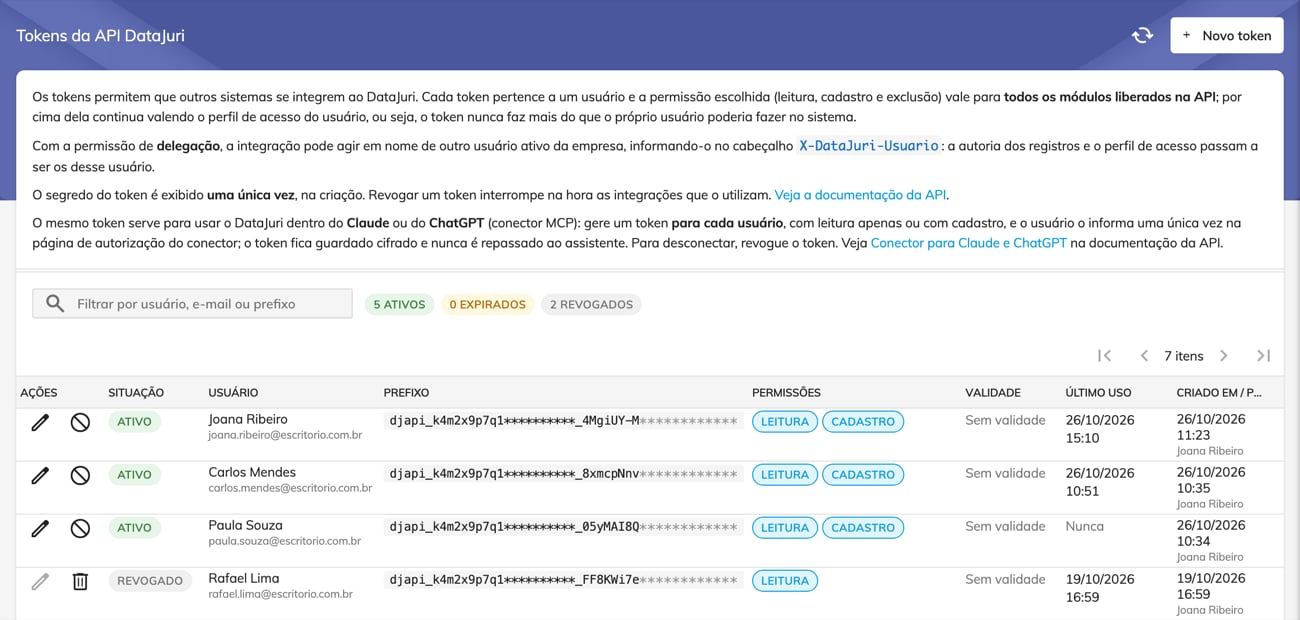
2
Create a token for the user, with the Reading role
Click Novo token (New token), choose the user and the Leitura (Reading) role. DataJuri allows creating and changing records through the integration, but in Morada OS those actions are still turned off, so the Reading role is enough. With a Reading-only token, DataJuri itself refuses any write.DataJuri shows the token secret only once, when it is created. Copy it and hand it to the person through a secure channel.
The token applies to every module released in the API, but never goes beyond the access profile of the user who owns it. If the administrator revokes the token, access stops immediately.
How to connect
1
Open DataJuri in Connectors
In the Morada OS sidebar, click Conectores (Connectors), find DataJuri and click Conectar (Connect).
2
Paste the token and authorize
Morada OS opens the Autorizar acesso ao DataJuri (Authorize access to DataJuri) page. Paste your user’s API token in the field and click Autorizar (Authorize).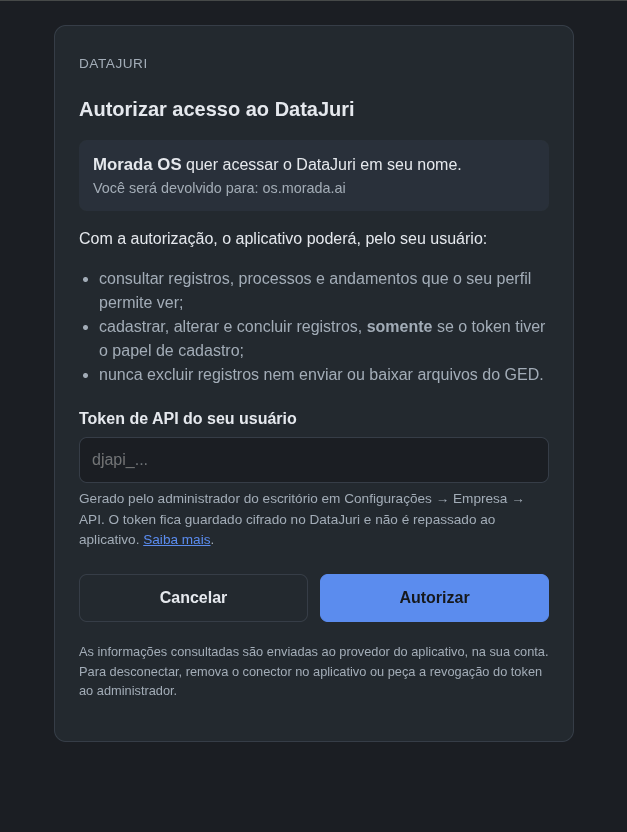
3
Ask in the conversation
Done. Go back to the conversation and ask, for example, “which deadlines fall this week?”.
The token is stored encrypted in DataJuri and is not passed on to Morada OS. That way your DataJuri access profile keeps applying to everything the assistant looks up.
What the assistant can do
In this version, Morada OS uses DataJuri for lookups only. The DataJuri integration allows creating, changing and completing records, but those actions are turned off in Morada OS for now. The integration does not delete records or send files to the GED (document store).The assistant only sees what your user would see on the DataJuri screen. If a question comes back empty or without access, check your user’s profile in DataJuri with the administrator.
Everyday use
How to disconnect
You have two paths, and both work:- In Morada OS: open Conectores > DataJuri and click Desconectar (Disconnect). The assistant stops accessing your DataJuri immediately.
- In DataJuri: ask the firm’s administrator to revoke your token. Access stops immediately, in every integration using that token.
Next steps
All integrations
Everything else Morada OS connects to and where to find each guide.
How to ask well
Three minutes that improve every request you make to the assistant.