

What you’ll get
The study’s numbers explained in plain language: how much the project generates, how much it costs, what the margin is, and how long it takes to pay for itself. Along with that come the risks that jump out of the spreadsheet itself and the assumptions that look too optimistic, which is exactly what the board is going to ask about.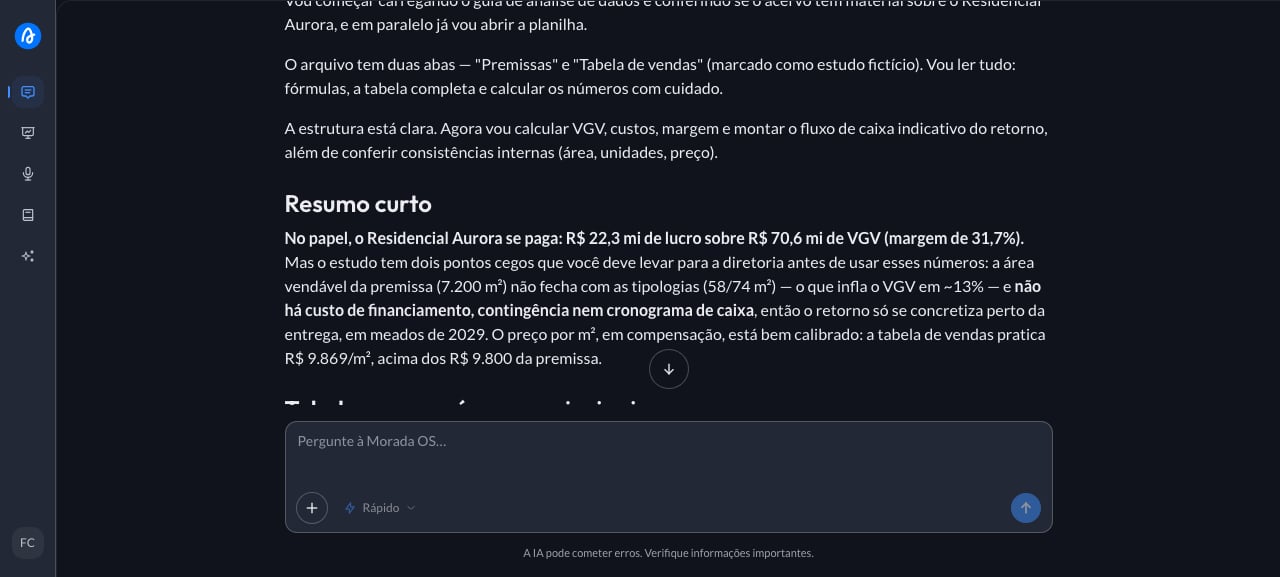
Step by step
1
Upload the spreadsheet to the chat
The feasibility study arrived as a spreadsheet with several tabs and you need to say, at Thursday’s meeting, whether the project pays for itself. You open Morada OS, drag the spreadsheet into the chat, and type:Don’t have one handy? Any study spreadsheet with assumptions and a sales table works for a test run.
2
Paste the request and adjust the brackets
With the file attached, paste the request below and adjust whatever doesn’t fit your case.
3
Get the analysis and the table
The assistant reads the spreadsheet (including when it has more than one tab), redoes the math, and answers with the summary, the table, and the list of risks. It also flags when the assumptions don’t line up with the rest of the file, for example a floor plan table that doesn’t match the sellable area the study assumes, which tends to be the most expensive gap to find late. Check that it picked up the right tabs: if your file has alternative scenarios, say which one counts. The numbers are still the ones in your spreadsheet, so a wrong assumption in there is still wrong here: the analysis helps you see, it doesn’t replace the review by whoever built the study.
Keep the conversation going
“Redo the analysis with construction costs 10% higher and show me what changes in the margin.”
“Build a table comparing this scenario with the conservative scenario on the other tab.”
“Turn this summary into five bullets for a slide.”
Tips and common problems
- Say which tab or scenario counts. Feasibility spreadsheets usually carry several versions, and pointing at the right one saves rework.
- If a number looks odd, ask where it came from. Write “show me which cell in the spreadsheet produced this value” and check it at the source.
- Explain what your abbreviations mean. If the spreadsheet uses in-house shorthand, one line explaining each one improves the result a lot.
Similar cases
- Turn a long report into a summary for the board. Also starts from a file you upload.
- Clean up a messy leads spreadsheet. Also works on a spreadsheet of yours.
- Compare the feasibility of two plots side by side (coming soon). This one starts from two spreadsheets uploaded in the same conversation.