

What you’ll get
A roundup of what came out in the last month about your region’s real estate market: launches, construction, changes to city rules, and the indicators that move sales and financing, such as INCC and the Selic rate. Every item comes with a link to the article, so you can open the ones that matter.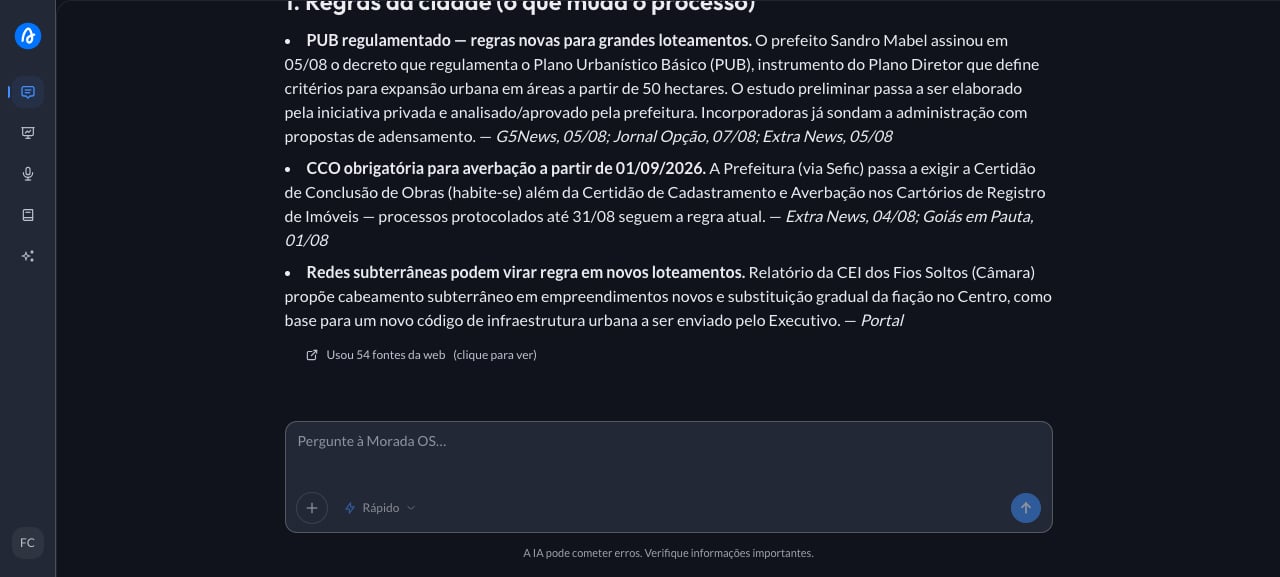
Step by step
1
Copy the ready-made request
This is the request you’ll use. Copy the whole thing.
2
Paste it into the chat and fill in the brackets
It’s Monday and you need to open the team meeting with a read on the market. Going through ten portals and three newsletters doesn’t fit the calendar. You open Morada OS and type:
3
Get the answer with sources
The assistant searches the web and returns the bullets in order of relevance, each with a link to where the information came from, usually grouped by theme (city rules, launches, indicators). Read the whole list, pick the two or three topics that affect your operation, and open those sources. Market news ages fast, so check the date before passing a number on to the team.
Keep the conversation going
“Explain in plain language what this Selic change means for someone buying off-plan.”
“Turn these bullets into a short message for me to send to the sales team.”
“Go deeper on the news about [topic] and tell me how it affects our region.”
Tips and common problems
- Name the city and the period. “The last four weeks in Curitiba” gives a much better result than “real estate market”.
- If old news shows up, tighten the window. Write “only consider what was published in the last 30 days” and ask again.
- The search covers the open web. Your company’s internal numbers (monthly sales, unit inventory) aren’t there: for those, use the Brain or upload the spreadsheet to the chat.
Similar cases
- Find out what your competitors launched in your region. Also web search only, no setup.
- Get to know a company before the meeting. Also with no prerequisites.
- Build a weekly market briefing for the team (coming soon). This one needs email connected, and nothing goes out without your approval.