

What you’ll get
A summary of about one page, written for someone with five minutes: the main points, the numbers behind each conclusion, and a short list of what deserves attention. No jargon, and none of that opening paragraph nobody reads.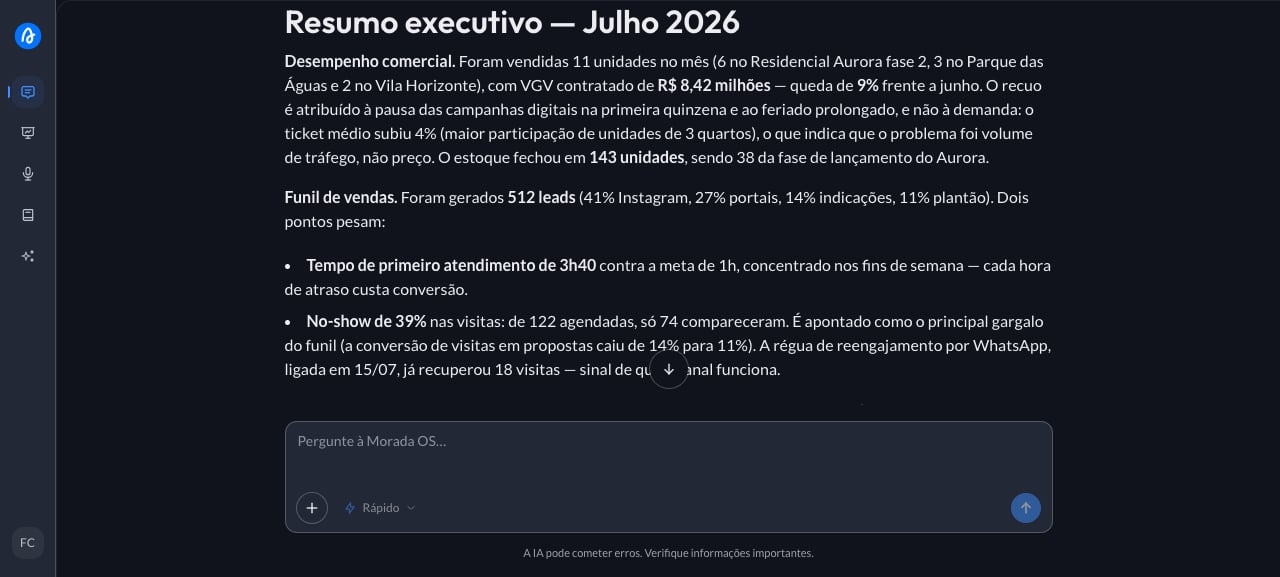
Step by step
1
Upload the report to the chat
A 60-page report just landed and the board meeting is right after lunch. You need to understand the essentials and be able to explain them in five minutes. You open Morada OS, drag the file into the chat, and type:Don’t have one handy? Any internal report in PDF or Word works for a test run.
2
Paste the request and adjust the brackets
With the file attached, paste the request below and adjust whatever doesn’t fit your case.
3
Get the one-page summary
The assistant reads the whole file and returns the summary in the format you asked for, with the numbers carried over and interpreted rather than just listed. Read the points to watch first, since they’re usually what the board will ask about. If a number surprises you, ask for the page it came from before repeating it in public: the summary is a reading shortcut, not a pass on checking.
Keep the conversation going
“Show me which page of the report each of these numbers is on.”
“Rewrite this summary as five bullets for a slide.”
“List the questions the board is likely to ask about this material.”
Tips and common problems
- Say who it’s for and what for. The same report becomes a different summary for the board and for the construction team.
- Ask for the length you want. “One page”, “ten lines”, or “five bullets” changes the result completely.
- If the file is scanned, mention it. A photographed or scanned document doesn’t always have readable text, and in that case it’s worth uploading the original.
Similar cases
- Analyze a development’s feasibility from the spreadsheet. Also starts from a file uploaded to the chat.
- Write the announcement copy for a launch. Also turns long material into short text.
- Summarize a document that’s already in the Brain (coming soon). This one needs the document published to the organization’s library.