

What you’ll get
A clean Excel file: columns with the same names, phone numbers and dates in the same format, duplicates flagged, and the records without a valid contact set aside. Along with it comes a summary of what changed, so you know what happened to your list before you use it.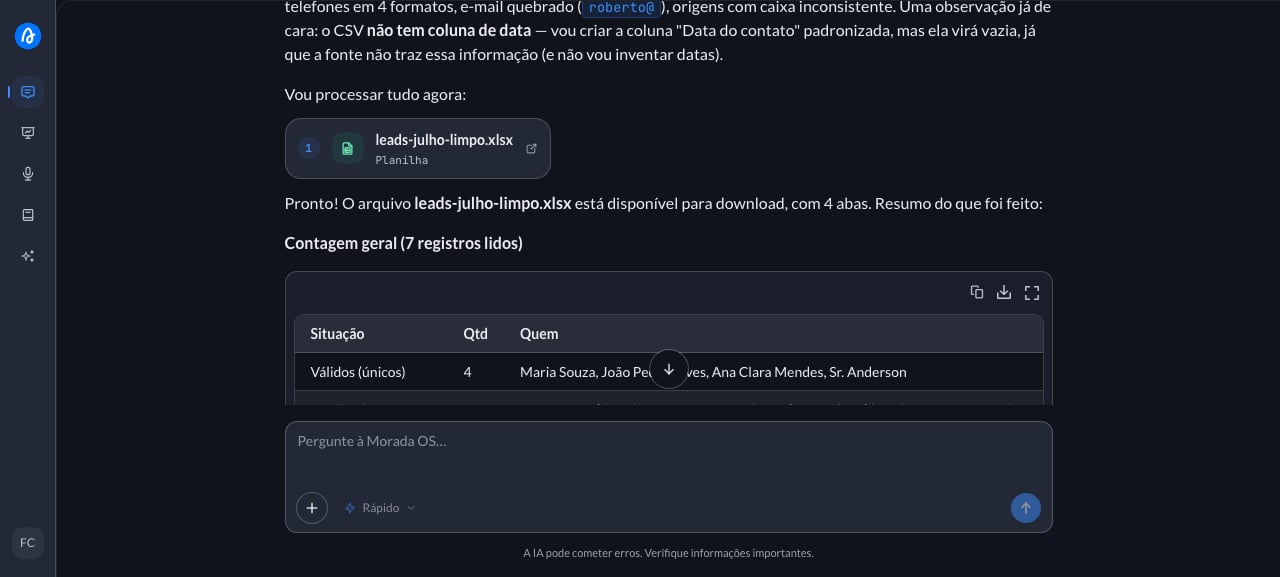
Step by step
1
Upload the spreadsheet to the chat
The leads spreadsheet from the trade show came from three different sources: one has “mobile”, another has “phone”, half the dates are written one way and the rest another. Before this goes anywhere, you open Morada OS, drag the file into the chat, and type:Don’t have one handy? Copy the sample below (fictional data), paste it into Excel and save it as a spreadsheet to try it out. This is the mess we mean:
2
Paste the request and adjust the brackets
With the file attached, paste the request below and adjust whatever doesn’t fit your case.
3
Get the clean file back
The assistant returns the file ready to download, usually with the duplicates, the invalid contacts, and the summary on separate tabs, and it explains what changed: how many rows were standardized, how many duplicates it found, and how many records ended up without a valid contact. Read the summary before the file. If the duplicate count comes back far above what you expected, the rule probably isn’t what you had in mind, and you just have to say which column defines a repeated lead. When a column is empty in the original, it says so instead of filling in a guess.
Keep the conversation going
“Treat records as duplicates only when the phone number matches, ignoring the name.”
“Split the leads by source and tell me how many came from each one.”
“Also give me a version with only the leads that have a valid email.”
Tips and common problems
- Say which columns you want at the end. Without that, the assistant picks for you and may keep names your team doesn’t use.
- Define what counts as a duplicate. Same phone, same email, or same name lead to very different results.
- Check the file before importing it. The spreadsheet comes back clean, but the decision to delete or merge records is still yours.
Similar cases
- Analyze a development’s feasibility from the spreadsheet. Also starts from a spreadsheet uploaded to the chat.
- Turn a long report into a summary for the board. Also works on a file of yours.
- Connect your CRM and the assistant reads the leads straight from there, no spreadsheet in between.