

What you’ll get
The content of that page you don’t have time to read in full, in the format you asked for: the main points, the numbers that appear in the text, and the publication date when the page provides it. It works for news articles, a competitor’s launch page, public notices, city legislation, and public PDFs.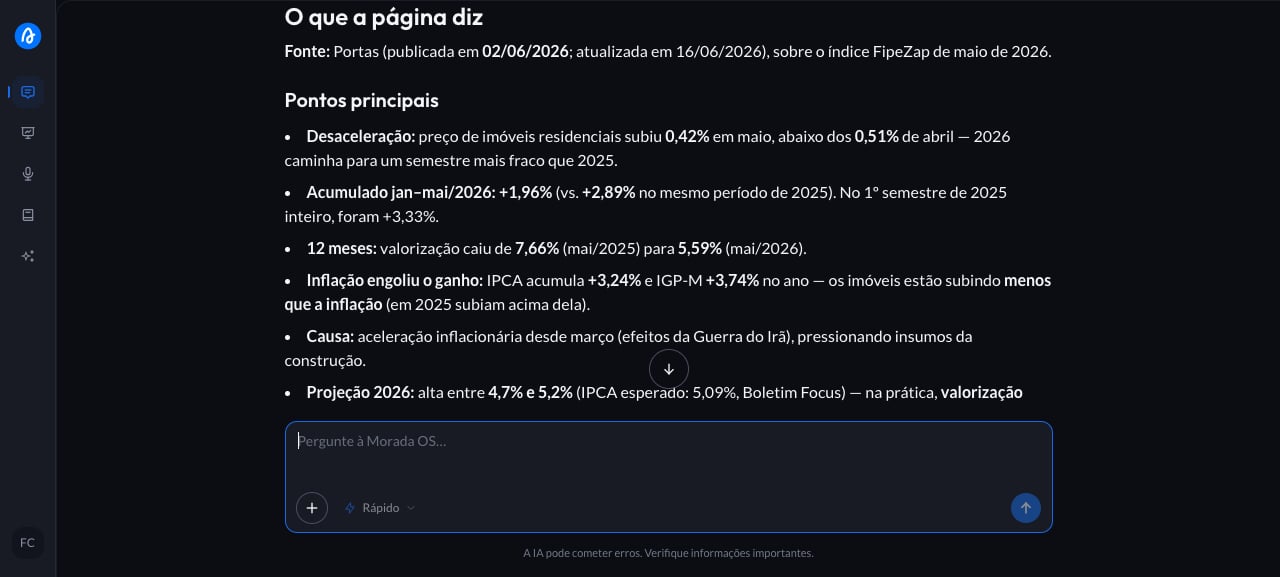
Step by step
1
Copy the ready-made request
This is the request you’ll use. Copy the whole thing.
2
Paste it into the chat with the link
Someone dropped a link in the team group about a change in your city and you need to know, in two minutes, whether it affects your developments. Instead of reading the whole thing, you open Morada OS, paste the request, and fill in the brackets. For the link, use the address that shows up in your browser’s address bar when you open the page. Public PDFs (a market report, an official notice) work exactly the same way.
3
Get the summary and check the source
The assistant opens the address, reads the content, and answers in the format you asked for. The link stays there in the conversation: before taking a number into a proposal or to a client, open the page and confirm it.
Keep the conversation going
“From that page, I only care about the [payment terms] part. Give me that section in more detail.”
“Compare what’s on that page with what you brought me about [another development].”
“List the links and images on that page so I can open what’s useful.”
Tips and common problems
- Paste the full address, starting with
https://, one at a time. Public PDFs work the same: if the link opens for anyone, you can paste it just like a page. - If it comes back empty, the content is probably closed off. Pages behind a login (an intranet, a subscription portal) or that only build their text after loading may not be readable. When that happens, copy the text and paste it straight into the chat, or save the page as a PDF and upload the file.
- Very long text comes back truncated. If the document is large and something is missing from the answer, ask for one part at a time: “read only the chapter on building rights”.
- If the document is yours, upload the file. For a spreadsheet, a contract, or an internal report, attach it to the chat instead of publishing a link.
- Don’t know where the information is? Then web search is the way: describe what you want and the assistant looks for it, bringing the link for each source.
Similar cases
- Find out what your competitors launched in your region. For when you don’t have the link and want the assistant to go find it.
- Keep up with real estate news in your city. Also with no prerequisites.
- Turn a long report into a summary for the board. For a document that’s yours: you upload the file instead of pasting a link.